hello, im the one making mochy. this wiki is where i explain how the app works and how to make your own modules for it. i tried to keep it with a lot of pictures instead of a wall of code, becuase reading code in docs is boring lol.
everything here comes from the real app, the screenshots are from the latest build. if something looks diffrent on your phone, you're probably on an older version, go update :p
mochy has four tabs at the bottom, plus the player that lives right above them. tap the bar below, it switches just like in the app:
Home: picked for you
Homewhat to play
→
Searchfind anything
→
Libraryyours
→
Profilestats + settings
tapping a tab you're already on scrolls it back to the top. tapping it from a page deeper inside (an album, a playlist) takes you back to the tab's own page, like every tab bar does.
Installing
getting mochy on your phone
go to the releases page and download the apk. arm64 is for almost every phone, universal works everywhere but its bigger.
open it, android asks if you trust the source, say yes.
open mochy, it walks you thru a few steps: a username, importing (you can skip), and a check if your phone can do blur.
mochy works on android 8 and newer. blur and glass need android 12, additional effects may needs android 13. older phones get a plain version that still looks nice.
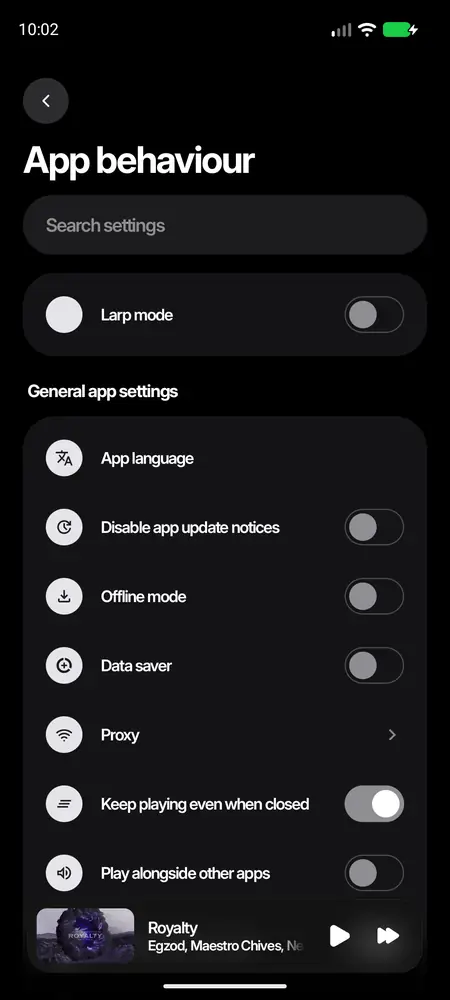
updates show up inside the app when theres a new one, you can turn that off in app behaviour.
Home
what to play, picked for you
1234
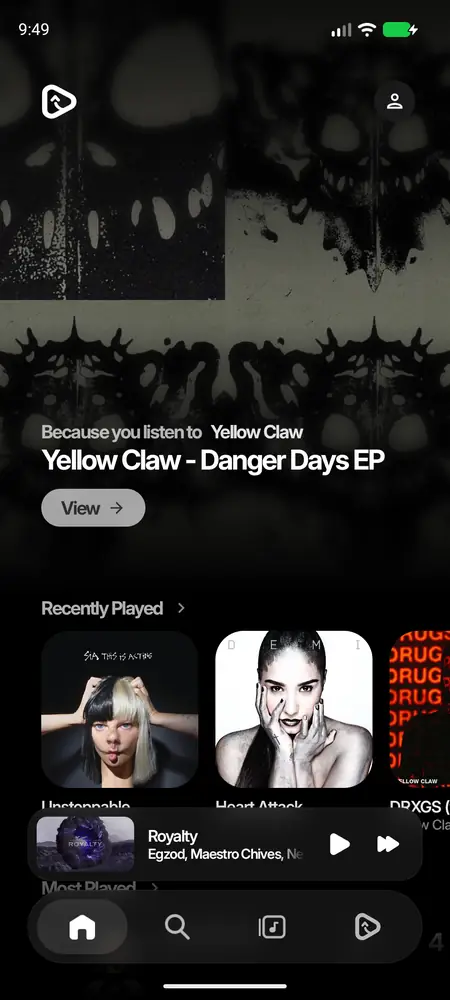
the hero. swipe it sideways. it rotates between songs on repeat, things picked from what you like, and the gacha card (roll it for a random song, its fun trust me).
shelves. recently played, most played, mixes. tap the title to see all of it.
the mini player. tap it to open the player, swipe it sideways to skip.
the bar. home, search, library, profile.
Search
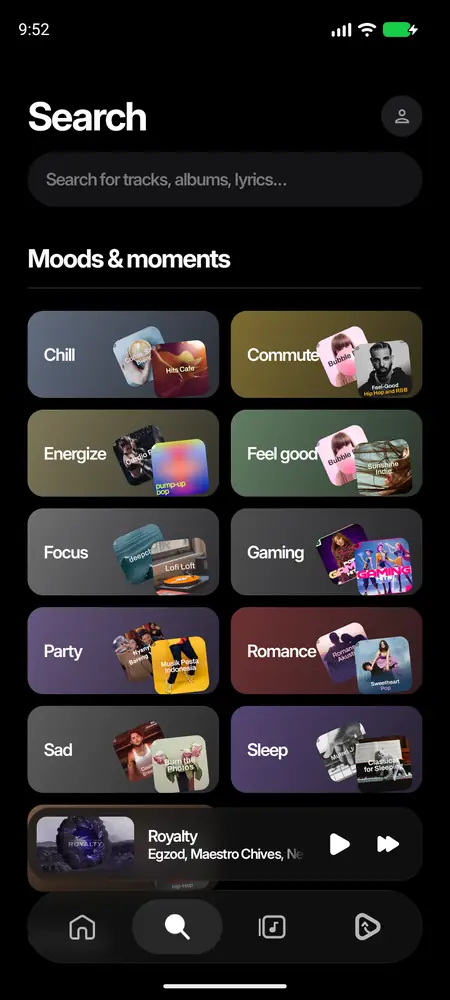
moods and genres at first. type to search songs, albums, artists, playlists and videos. tap search twice fast and it goes straight to typing.
Home has three styles too (mochyy, listen now, hop in), change it in customisation.
Player
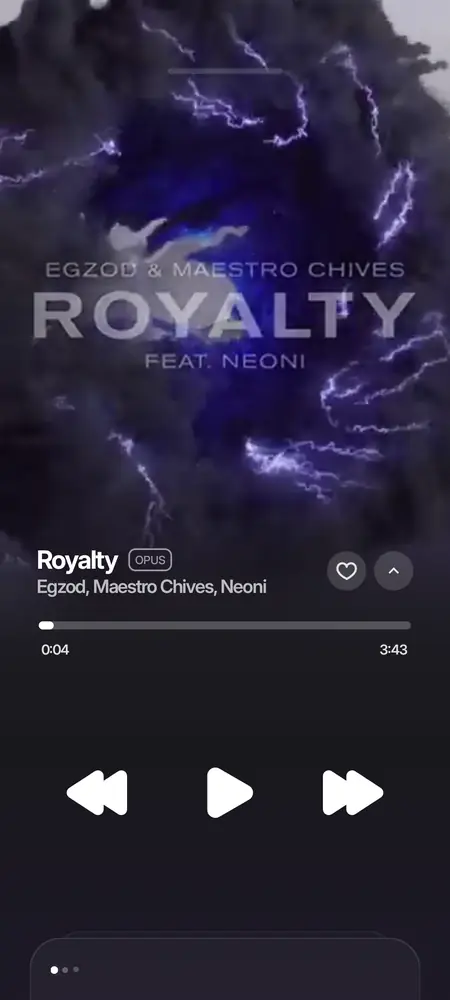
and all the ways it can look
1234
the cover. swipe it to change song. some songs have an animated canvas or their music video here.
the title. the little badge beside it says the format (opus, aac, flac).
seek bar. drag it anywhere.
controls. swipe the player down anywhere to close it.
Changing the style
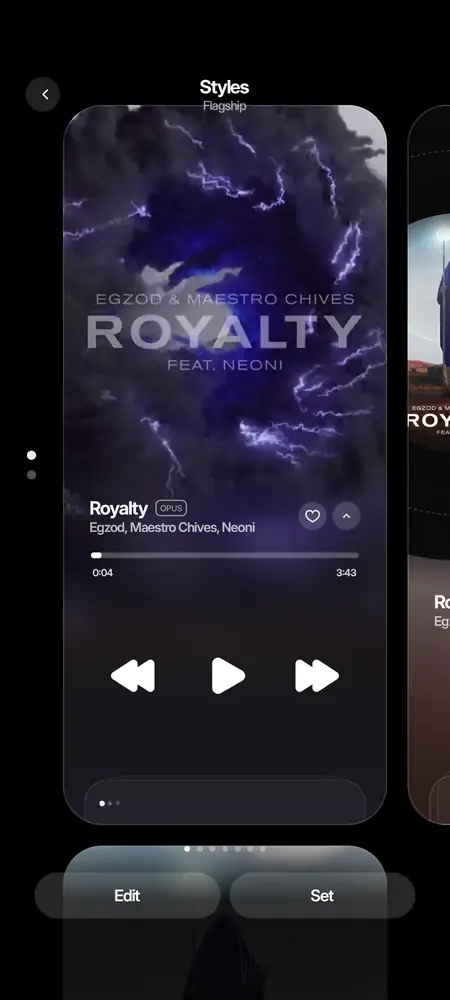
hold the player and it shrinks into a picker of styles. swipe between them and tap one.
Flagship
Classic
Turntable
iPod
Poster
Timeline
Lyrics
Bedside
Video
a look module can bring a style of its own too, it shows first in that list. (see player style)
Lyrics
word by word
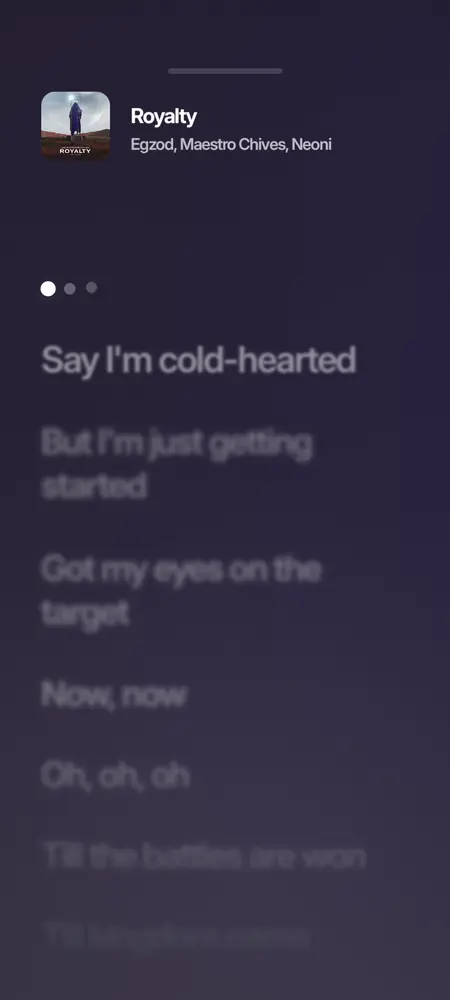
tap the card at the bottom of the player to open the lyrics. the line being sung is bright, the rest fade.
mochy asks a bunch of lyric sources at once and keeps the best one (timed lyrics win). you can switch source from the player's menu, nudge the timing, or translate them.
with a music video playing, lyrics follow the video instead of the album version.
lyrics modules join the list too, and go first while their on.
Library
your music, from everywhere
12
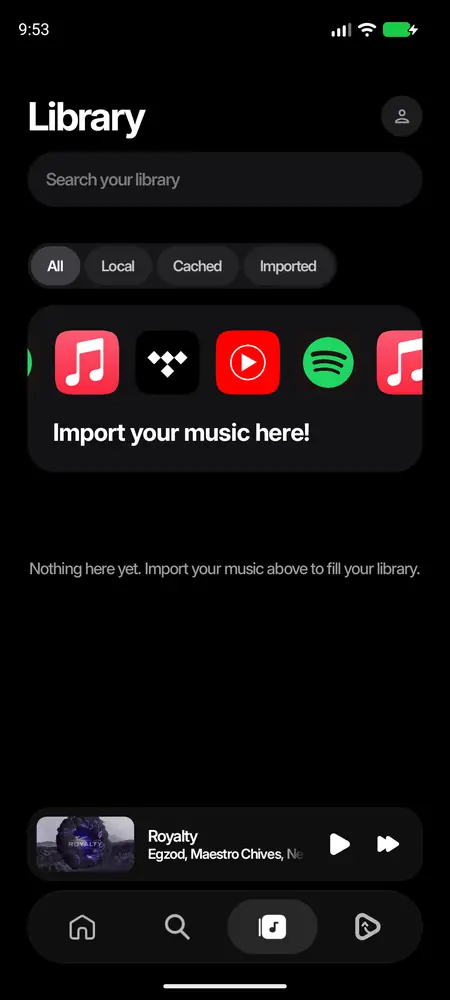
filters. all, local (files on your phone), cached and imported.
import. bring playlists and likes from spotify, youtube music, apple music and tidal. it matches every song so it plays here.
downloads live here too. they come from the best source in your download order (audio quality page), as one file the phone can play.
Audio lab
make it sound like you want
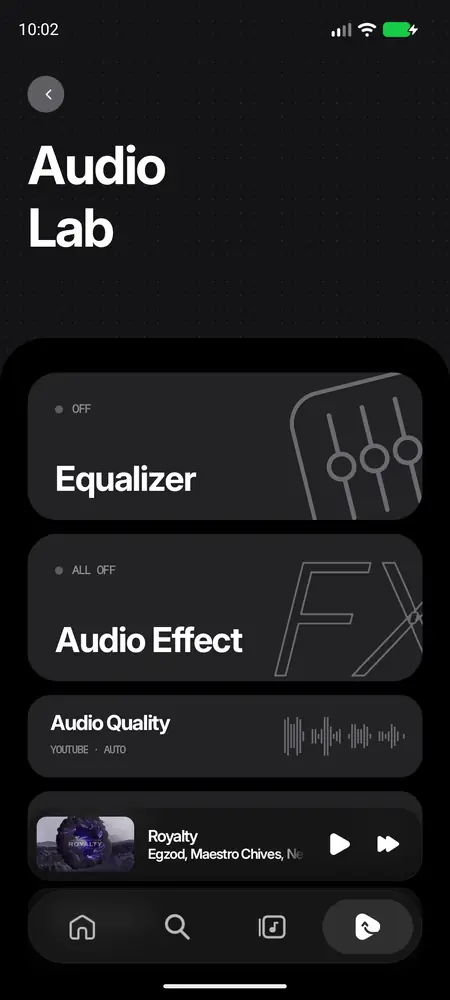
settings → audio lab. the equalizer, audio effects (reverb and friends), crossfade, and audio quality.
audio quality has the provider order: each song plays from the first provider thats on and has it. youtube music is one of them, modules that play songs are the others.
Monochromelossless
→
your module
→
YouTube Music
Stats
replay it. look at the past.
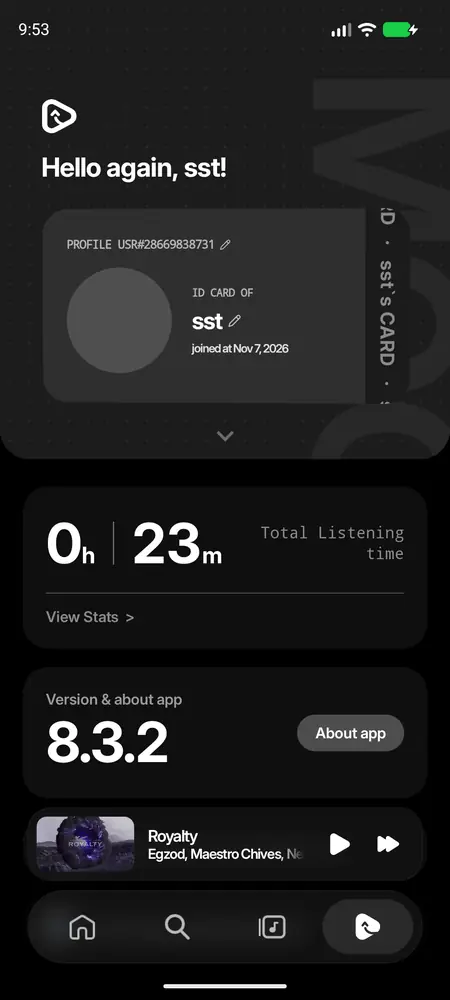
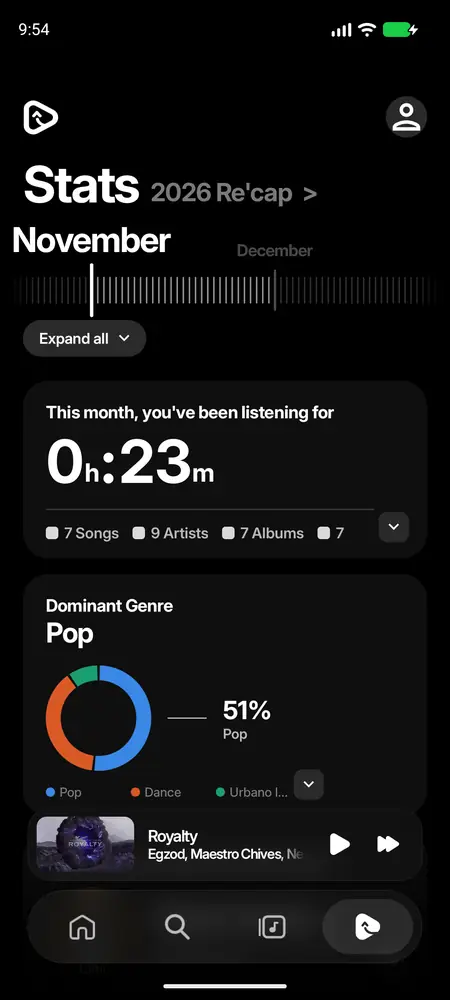
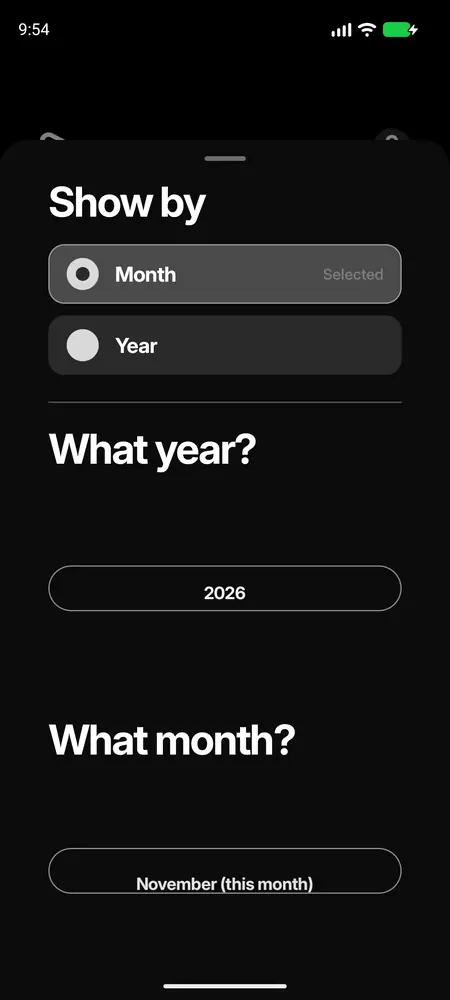
profile → view stats. how long you listened, your top songs, artists and genres, per month or year.
the recap is the story version, like a wrapped, whenever you want.
pick the month or the year and play through it.
all of this stays on your phone, mochy never sends it anywhere.
Settings
everything, sorted
12
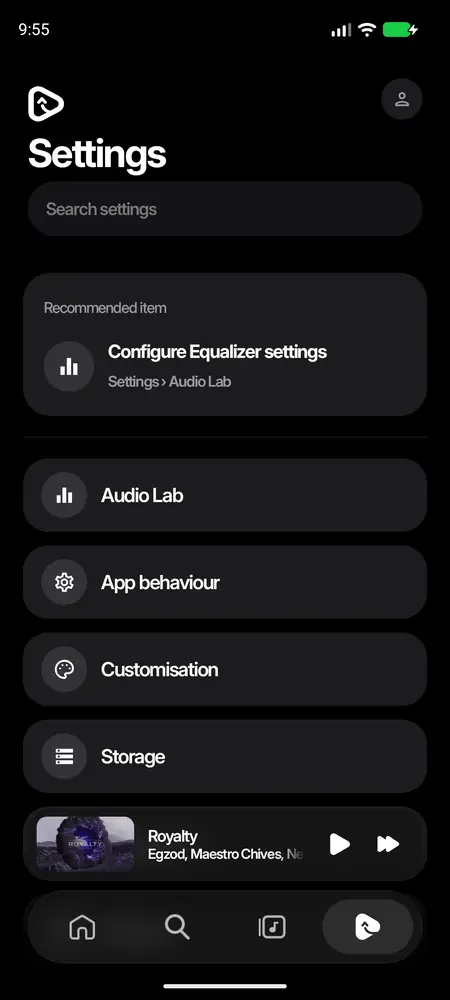
search. type any setting, it takes you right to it.
categories. audio lab, app behaviour, customisation, storage, integrations, modules. pages that modules bring show up under modules.
Data saver
app behaviour → data saver. try it:
Data saver
Only on mobile data
Modules
what they are, and every kind you can make
ok so this is my favourite part of mochy. a module adds something to the app without you waiting for me to ship an update. most of the time it's just a folder with a manifest.json in it (a small text file that says what you want), zipped up. mochy reads it and builds everything with its own parts, so your thing looks and feels like it was always in the app.
there are a few kinds, and one module can be any mix of them. tap one to jump to its page, each has a full example you can copy:
every module can also have an icon and a banner, settings people change on its page, and an update button that shows up by itself when you publish a new version.
Where you see them
123
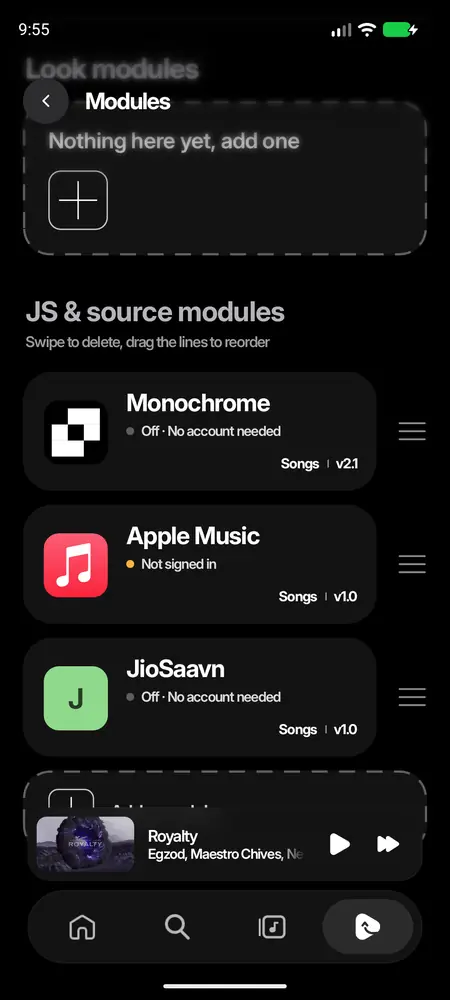
look modules are the ones that only change how mochy looks: looks, players, bars, pages.
JS & source modules bring songs, lyrics or song info.
drag a row by its lines to reorder, swipe it left to delete. the order is the order songs, lyrics and song info are asked in. tap a row to open the module's own page.
each row shows the icon, the name, a dot for how it's doing (green is on, grey is off, amber means it needs something), what it adds and its version. when a newer version is out, a white update pill shows up on the row too.
nothing from a look, a player, a page, a web module or a plain zip runs inside mochy as code. they only hand back json, stream links and look values, and mochy draws everything with its own parts. that's why anyone can make one and nobody has to trust it with the app.
the only exceptions: code modules (only loaded when they're signed with mochy's own key, so only i can make them), JS Modules scripts (sandboxed inside that module, no access to your phone or the app, only the internet through mochy), and shaders, which run on the gpu and can only paint pixels.
How modules work
what mochy does with yours, from adding it to removing it
before you build anything, here's the whole life of a module, so nothing surprises you later.
1. add ita link, a zip or github
→
2. mochy checks itshows what it adds
→
3. it sits there, off
→
4. you flip enable
→
5. it's live
→
6. updatewhen you publish
→
7. removegives everything back
1 and 2: adding and checking
whatever way it comes in, mochy reads the manifest.json first and shows a little sheet: the name, what it adds (songs, lyrics, song info, a look) and where it came from. nothing is installed until you tap add. a zip's pictures, fonts and shaders are unpacked into mochy's own files right then, so a look works offline after that.
3 and 4: the one switch
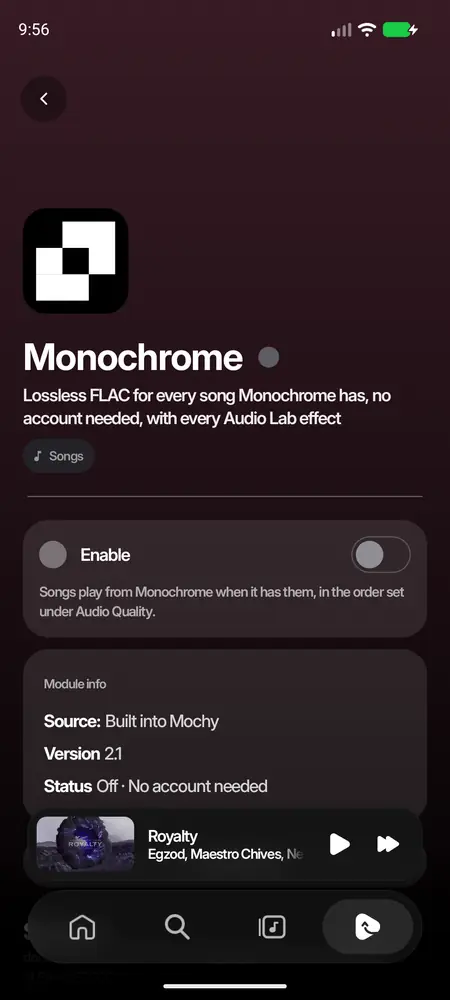
every new module starts off, so adding one never changes anything until you turn it on yourself. each module has exactly one switch. off means gone everywhere: from audio quality, the provider order, the download order, the lyrics sources, about song, settings, the player's menu and the look.
5: what "live" means for each kind
it adds
while it's on, mochy…
a look
writes its values onto your settings and remembers what they were before. turn it off and your own come back, exactly how you had them. change something by hand while it's on and your change wins, even after it goes off.
a player
puts it first in the style picker and switches to it. off, your own style comes back.
a bar
draws the nav bar, the wide bar and the mini player with your shader instead of the frost (android 13+).
pages
lists them on the module's page, puts the ones you marked in settings, and adds your rows to the player's menu.
songs
asks it for every song in the provider order (audio lab → audio quality). the first one that has the song plays it. a module that doesn't answer in 12 seconds is skipped for that song.
lyrics
adds it to the lyrics sources, first in line when you turn it on. it's graded like every other source, so word synced beats line synced beats plain.
song info
asks it when about song opens, along with mochy's own sources. each fact comes from the first module on your list that knows it.
Only one look at a time
anything that changes how mochy looks (look settings, a player, a font, a bar) counts as a look, and only one look is on at a time. turning a second one on turns the first off and gives its settings back first. a module that only brings pages or menu rows doesn't count, so it can stay on next to a look.
The order
the order on the modules page is the order mochy asks modules in. drag a song module above youtube and it's asked first. lyrics and song info modules follow the same order.
6: updates
a module added from github or from a link remembers where it came from. a few times a day, when you open the modules page, mochy quietly asks there if anything new is out. if there is, an update button appears. tap it and the new version goes in place, switch and settings untouched. the whole story is on adding & updating.
7: removing
swipe the row left, or tap remove this module on its page. its look gives your settings back, and its pictures, fonts, shaders, settings and anything you added to it are deleted with it.
A module's page
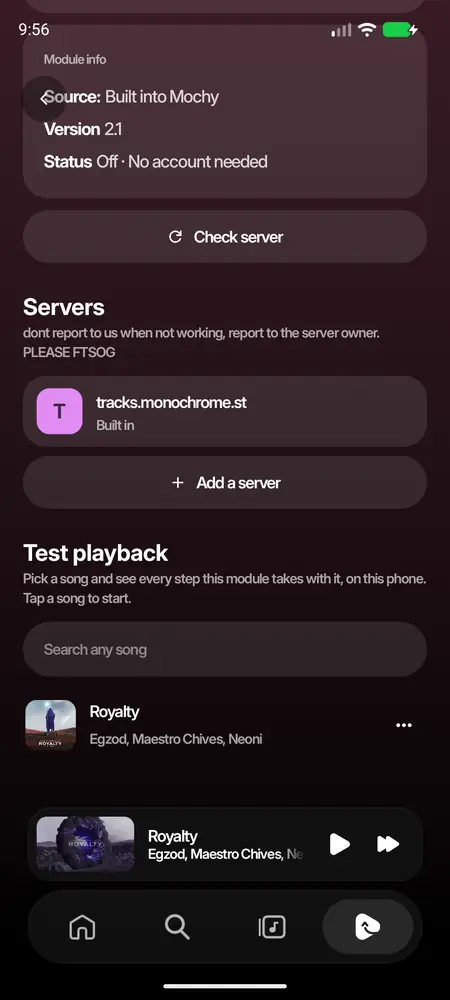
top to bottom: the banner (the page takes its colour from it), the icon and name, enable, module info (added date, where from, version, author, status, and why a shader didn't load if one didn't), updates (for github and link modules), account buttons, the data saver card, options (your settings), servers or items, pages, test the module, and remove.
Your first module
two minutes, i promise
the easiest module is a look in a zip: one json file and an icon. this one turns mochy pure black with sharp corners and the turntable player.
1. a foldermidnight/
→
2. manifest.json+ icon.png
→
3. zip it
→
4. add from a file
→
5. turn it on
midnight/
├── manifest.json     // what the module is and what it changes
└── icon.png          // a square picture, 512×512 is plenty
make a folder called midnight. put that manifest.json in it, plus a square icon.png.
zip it. mac: right click the folder → compress. windows: right click → send to → compressed (zipped) folder. terminal:cd midnight && zip midnight.zip manifest.json icon.png
send the zip to your phone. in mochy: settings → modules → add a module → add from a file → choose a .zip.
mochy shows what it adds. tap add, open its page and flip enable.
thats a whole module! turn it off and your own settings come back. from here every page in this wiki just adds one more thing to that same manifest. want to see where it ends up? neon night is a full player and liquid glass is a full bar with a page.
tip: while you're making it, keep the zip on your phone and add it again after every change. adding a zip with the same id updates the module in place, its switch and settings stay.
File structure
what goes where, for every kind of module
here's every layout mochy understands. the rules first, then a tree for each kind.
The rules for a zip
manifest.json sits at the root of the zip, or inside one folder (that's how most zip tools pack a folder, so both work). mochy only looks through the first 200 entries for it, and it has to be under 256 KB.
paths in the manifest are relative to the manifest, use /, and are case sensitive: Images/Icon.PNG is not images/icon.png.
mochy unpacks pictures (.png .jpg .jpeg .webp .gif), fonts (.ttf .otf) and shaders (.agsl .sksl). up to 200 files, 8 MB each, 30 MB in all. everything else is ignored, and so are macos's hidden __MACOSX and ._ files.
a path can't climb out of the module (../ is dropped).
folder names are up to you. i use images/, fonts/ and shaders/ so it's easy to read.
my-module.zip                    my-module.zip
└── manifest.json                └── my-module/
                                     └── manifest.json
// both of these work
a look made only of settings also works as a link to its manifest, like https://raw.githubusercontent.com/you/midnight/main/manifest.json. pictures then sit next to the manifest.
A player
neon-night.zip
├── manifest.json        // "player": { "keyframes", "styles", "blocks", ... }
├── images/
│   ├── icon.png
│   ├── banner.webp
│   ├── grain.png        // a background layer
│   └── rim.png          // a frame drawn over the spinning cover
├── icons/
│   ├── heart.png        // your own button icons, white on transparent works best
│   └── heart-on.png
├── fonts/
│   ├── Sora-Regular.ttf
│   └── Sora-Bold.ttf
└── shaders/
    ├── aurora.agsl      // a background shader
    └── meter.agsl       // a shader block
a player can come from a link too, but fonts and shaders need the zip (a font has to be a file on the phone, and shaders are code for the gpu).
these live on a server, because the answer depends on the song. the server is the module:
https://my-flac.example/
├── manifest.json        // GET: what it is and what it answers
├── search?q=…           // GET: songs that match
├── stream/{id}          // GET: the stream of one of them
├── lyrics?title=…       // GET: lyrics, if it's a lyrics provider
├── metadata?title=…     // GET: song info, if it's a song info provider
└── icon.png             // optional, next to the manifest
people add it by pasting https://my-flac.example. want to hand it out as one file instead? put a url in the manifest and zip it:
my-flac.zip
├── manifest.json        // "url": "https://my-flac.example", "resources": [...]
└── icon.png             // the zip's pictures win over the server's
this zip isn't a module on its own, it's added on JS Modules' page. see scripts.
On GitHub
your repo holds the source, the release holds the zip people install:
github.com/you/neon-night
├── module/                          // what goes in the zip
│   ├── manifest.json
│   ├── images/ …
│   └── shaders/ …
├── build.sh                         // zips module/ (optional, see below)
└── README.md
releases/
└── v1.2
    └── neon-night.mochyymodule.zip  // the file mochy installs, "mochyymodule" in its name
#!/bin/sh
# a tiny build.sh: checks the manifest is valid json, then zips module/
set -e
python3 -c "import json; json.load(open('module/manifest.json'))"
mkdir -p build
cd module && zip -q -X -r ../build/neon-night.mochyymodule.zip . -x ".*" && cd ..
echo "built build/neon-night.mochyymodule.zip"
manifest.json
field by field
every module, link or zip, describes itself with one manifest.json. here's every top level field:
field
needed?
what it's for
id
id or name
short and stable, like neon-night. mochy turns it into web.neon-night (link) or local.neon-night (zip), so it can never replace a built-in module. never change it: adding the same id again is how a module updates
name
id or name
what people see
version
no
shown on its row and page, and on the update button. bump it every time
what a server answers: search + stream plays songs, lyrics makes it a lyrics provider, metadata a song info provider. plain names or { "name": "search" }
fields mochy doesn't know are ignored, so a manifest written for a newer mochy still opens on an older one. the same goes for blocks and animations inside a player: an older mochy skips what it doesn't know.
Two rules worth knowing
a manifest with no resources and nothing that changes the look (look, player, font, pages, actions, glass, or settings that carry a look or a glass) is read as a song source, because that's what most services like this are.
a website's own manifest.json is turned away. websites have one for "install to home screen", with start_url, display, short_name or icons. a manifest with any of those and none of the module fields gets "that's a website, not a module". so don't use those names.
Numbers and text
mochy is forgiving: "12" and 12 both work, so do "true" and true. every number is kept in range, so a typo can never break anything: a size of 500 just becomes the biggest one allowed. colours are "#RRGGBB" or "#AARRGGBB" (the first two digits are how see-through it is).
Icon & banner
make it look like yours
1234
banner. wide, about 2:1 (1200×600 is plenty). it fades into the page, and the page takes its colour from it. keep the bottom third calm, the icon and name sit over it.
icon. square, 512×512 is plenty. shown on the row, big on the page and next to its pages in settings. mochy rounds the corners, so give it square ones.
name + dot. green is on, grey is off, amber means it needs something.
no banner? mochy blows your icon up and softly blurs it instead. no icon either? your first letter on a colour.
Where a picture can come from
this is the same everywhere in a module: icons, banners, player pictures, button icons, page pictures, menu row icons.
you write
it means
"images/banner.webp" in a zip
a file in your zip, next to manifest.json
"https://example.com/banner.webp"
a link
"icon.png" in a link module
a file next to its manifest: with https://you.github.io/glass/manifest.json it's https://you.github.io/glass/icon.png
.png, .jpg, .webp and .gif work, up to 8 MB each. webp is the smallest. a phone screen is about 1080 pixels wide, so a 1080×2400 background is already plenty.
Settings
options people change on your module's page
settings lists your module's own options. they show under options on its page, like this (go on, press them):
Region
Allow explicit songs
"settings": [
  { "key": "region", "label": "Region", "type": "select", "default": "us",
    "options": [
      { "value": "us", "label": "United States" },
      { "value": "jp", "label": "Japan", "description": "Songs from the Japanese catalog" }
    ] },
  { "key": "token", "label": "Your API key", "type": "text", "hint": "Paste it here",
    "description": "Find it in your account page" },
  { "key": "explicit", "label": "Allow explicit songs", "type": "toggle", "default": "true" }
]
field
what it's for
key
the setting's name, the same forever. it's also the query parameter a server gets, and the name a player uses in when, states, $colours and {$key} text
label
what people see. without it the key is shown
type
select (round rows to pick one), text (a line to type in, saved when you stop typing) or toggle (a switch). left out, mochy works it out: options make a select, a "true"/"false" default a toggle, anything else text
default
what it starts as. a select starts on its first option without one, a toggle starts off
options
for a select: plain values (["us", "jp"]) or objects with value, label, description, look and glass
hint
for text: the grey words in the empty field
description
a line under the setting. a picked option's own description shows under the list
look, glass
for a toggle: the look or glass change it puts on while it's on
Where the values go
you pickon the page, in a page, or in the player's customise sheet
→
mochy keeps it
→
it goes where it's needed
a server gets every setting as a query parameter on every call (/search, /stream, /lyrics, /metadata): ?region=jp&token=abc&explicit=true. a value nobody set goes as its default.
a module that plays songs keeps quality and atmos for mochy's own stream and dolby atmos choices, so those two never show as options.
a player reads them live: blocks show or hide with when, states switch, colours and text follow. see states & events.
a page can show any of them with a setting block.
a zip with its own code gets them through ModuleFields.onFields (for devs).
Settings that change the look or the glass
an option, or a toggle that's on, can carry a look of its own. it's laid over the module's look while the module is on. when someone picks something else, mochy gives the old values back and puts the new ones on. a glass works the same way: a blur, a margin and uniforms laid over your bar's glass. that's how one module offers "liquid" or "clear" glass, or hands the bars back to mochy's frost:
a module whose settings carry a look or a glass counts as a look, even with no look of its own.
Adding & updating
four ways in, and the update button
everything starts at settings → modules → add a module. whichever way you pick, mochy checks the module first and shows you what it adds before anything is installed.
From a linkpaste a server's link (https://my-flac.example) or the link to any manifest.json. both work.
From GitHubpaste a github project's link. mochy grabs the module zip from its newest release. how to set that up
From a filepick a module's .zip that someone sent you on discord, telegram or as a download.
From the catalogthe list under the link box, read straight from github so it grows without an app update.
The update button
a module that came from github or from a link remembers where it came from, and mochy checks there for you:
you open settings → modules
→
mochy asks the sourceat most every 6 hours per module
→
something new?
→
an update pill on its rowand an update card on its page
→
one tap
it came from
"something new" means
the button says
a github project
a newer release, or the same release with its mochyymodule zip uploaded again (so a quick fix without a new tag still reaches people)
the release's tag, like update to v1.3
a link
the manifest.json changed at all, even if you forgot to bump the version
the new version, or update now when the version didn't change
a file from the phone
mochy can't know, there's nowhere to ask
no button. add the new zip again to update it
on the module's page, the updates card says where it updates from and when it last checked, with a check for updates button that asks right now. updating keeps the module's switch, its settings, its order and anything you added to it. if the module is a look that's on, the new look goes on straight away and your own settings are still given back properly when it goes off.
why only every few hours? github lets an app ask 60 times an hour without an account, shared by everyone on the same wifi. checking each module a few times a day keeps everyone well under that.
Updating by hand
adding a module with the same id again always updates it instead of adding a second copy. paste the same link, or pick the new zip.
Removing
swipe the row left on the modules page, or tap remove this module on its page. its look gives your settings back, and its pictures, fonts, shaders and settings are deleted with it.
Backups
modules you added are kept in mochy's backup like everything else, zips and code modules included.
Publishing on GitHub
a link people paste once, and updates that find them
if your module lives on github, people don't need to download anything themselves. they paste your project's link, mochy finds the module in your newest release and installs it. and every release you publish after that shows up as an update button on their phone.
github.com/you/vinyl
→
newest releasenot drafts or pre-releases
→
the zip named *mochyymodule*
→
checked like any zip
→
add
Naming the zip
attach your module's zip to a release and put mochyymodule in its file name. that's the only thing mochy looks for, so other files in the release (source code, screenshots, apks) are left alone.
file name
picked?
vinyl-night.mochyymodule.zip
yes ✓
liquid-glass-1.2.mochyymodule.zip
yes ✓
vinyl-night.zip
no, it doesn't say mochyymodule
vinyl.mochyymodule.tar.gz
no, it has to be a .zip
the zip itself is exactly the same as one you'd send as a file. see file structure.
The links that work
someone pastes
mochy takes
github.com/you/vinyl
the newest release
github.com/you/vinyl/releases
the newest release
github.com/you/vinyl/releases/tag/v1.2
exactly that release (updates still follow your newest one after)
github.com/you/vinyl/blob/main/manifest.json
not a release: treated as a normal link
Debug and release builds
a module with its own code has to be signed like the mochy it runs in. if your release has two zips with mochyymodule in the name, mochy takes the one with debug in its name on debug, fast and profileable builds, and the other one on a release build. so js-modules-debug.mochyymodule.zip next to js-modules.mochyymodule.zip just works, for installs and updates alike.
Shipping an update
bump version in your manifest. keep the id the same, always.
make the zip, publish a new release and attach it.
that's it. within a few hours everyone who has it sees update to v1.3 on its row. people who want it now can tap check for updates on its page.
limits: the zip can be up to 40 MB. a project with no release, or a release with no zip named mochyymodule, gets a friendly message saying so.
# with the github cli, from your module's folder
zip -r vinyl-night.mochyymodule.zip manifest.json images fonts shaders
gh release create v1.2 vinyl-night.mochyymodule.zip --title "Vinyl Night 1.2"

# fixed something small? upload over the same release, people still get the button
gh release upload v1.2 vinyl-night.mochyymodule.zip --clobber
Looks
restyle mochy, safely
a look is a list of mochy's own settings with the values you want. while your module is on they're put in place, and when it goes off people get theirs back. it's the simplest module there is.
one at a timeturning a second look on turns the first off and gives its settings back first. a module with only pages or menu rows doesn't count, so it can stay on next to one. a player, a font or a bar does count.
you always winchange a setting by hand while a look is on, and you keep your value when the look goes off.
survives restartsmochy remembers what each look replaced, so turning it off after a restart still gives the right settings back.
nothing runsa look is a description. mochy draws it with its own parts, so it stays smooth on slow phones and can't break anything.
Look settings
a look may change only these, so a module can restyle mochy but never reach your accounts, the network or playback. values are written as text ("true", "12", "FLAGSHIP"). keys are spelled exactly like this, style names can be any case, and a value out of range is simply ignored.
key
values
what it changes
bottomBar
FROSTED, MODULE
the glass of the nav bar, the wide bar and the mini player. MODULE is your own bar and is picked for you when you bring one
while your look is on, the whole app uses this font, your player and pages included.
.ttf and .otf work.
bold is optional. without it, bold text is drawn thicker from the regular one.
a font has to be a file on the phone, so it only works from a zip.
a broken font file is skipped and the app keeps its own, nothing crashes.
check the font's license lets you share it. google fonts are all fine.
Your own player
design the now playing screen
a player in your manifest describes a whole now playing screen. while your look is on, it's the first style in the style picker (hold the player to open it) under the name you give it. mochy switches to it when your look turns on, and back to the person's own style when it goes off.
i made this part really deep on purpose. you can keep it simple (a cover, a title and controls) or go wild: frosted panels, your own svg icons, blurred layers, keyframe animations driven by the bass, states that switch the whole layout when you pause, a shader background. the next pages go through all of it, one thing at a time.
What you get for free
your player gets everything the other styles have, without writing anything: swipe sideways to change song (your cover and words ride along), tap to play or pause, swipe down to close, the chevron menu (lyrics, shuffle, repeat, other menu, edit player, plus your own items), turning sideways, and its clocks resting while it's hidden.
How it's put together
a player is a background at the back and a list of blocks on top, laid out top to bottom in order. that's really it. everything else is more kinds of blocks and more ways to dress and move them.
rules shared by many blocks, css style (style sheets)
customise
the settings in your player's customise sheet (customise & menu)
menu
up to 4 items of your own in the chevron menu
Laying things out
space with "grow": true pushes things apart. two growing spaces around everything centre it on the screen.
row puts its blocks side by side. words, bars, visualizers, columns and boxes share the width; covers, pictures, shapes and buttons keep their own size.
column stacks its blocks, handy inside a row.
stack lays its blocks on top of each other, the first at the back. that's how you put a ring visualizer around a cover, or a sticker over it.
box is a column (or a row) on a panel: frosted glass, a colour or a gradient, round corners, a border. see panels, shapes & blur.
groups can go four deep. a block mochy doesn't know is skipped, so a newer layout still opens on an older mochy.
it stays smooth because nothing you write runs as code on the main thread. mochy draws every block with its own parts, everything that moves is worked out while drawing (so it never rebuilds the screen), and every loop, visualizer and shader stops the moment the player is closed. i test every feature here on a redmi note 11 pro, which has a pretty weak gpu.
Blocks
every piece you can put on the screen
each block is an object with a type. every number is kept in range, so a typo can't break the player. defaults are in brackets.
The song
type
what it shows
fields
cover
the song's cover, riding the swipe between songs
shape: rounded, circle, square (rounded) · corner 0–80 (18) · size share of the width 0.1–1 (0.8) · spin turns like a record while playing (false) · spinSpeed 0.1–4 (1) · frame a picture over it that stays still while it spins · shadow (false)
style: line, thick, pill (line) · color (ink) · track (chip) · times show the times (true) · seek (true)
controls
previous, play/pause and next together
size 28–96 (48) · style: circles or plain · color the circles' fill · icon the icons' colour
button
one control, or a custom action, in a circle
action or link/page/search · size 24–96 (44) · color icon colour · fill circle colour · image your own icon · imageOn your icon while it's on. all the actions
Decoration
type
what it shows
fields
text
your own words, with the song and your settings filled in
text (up to 200 characters) · text fields (14, medium, inkSoft). see placeholders
image
your picture
image · height 8–600 (120) · width (full width) · corner 0–80 (12) · fit: crop or fit (crop) · tint recolours it, for one-colour icons
shape
a box, a circle, a pill or a line
shape: rect, circle, pill, line · width (full) · height 1–600 (2) · color, or colors for a gradient · corner 0–300 · stroke 0.5–40 to only outline it
for title, artist, album, text and time: size 8–72 · weight: thin, light, normal, medium, semibold, bold, black · color · lines 1–4, longer text ends in "…" · upper true for CAPITALS · align: start, center, end.
a text block fills in placeholders. the song ones ride the swipe between songs like the title does:
anywhere a colour goes you can write a fixed one, "#FFFFFF" or "#80FFFFFF" (with see-through), or one that follows the song:
name
what it is
ink
the style's main text colour
inkSoft
softer text
played, remaining
the song's two tones, from its cover
chip
the faint fill behind buttons
cover
the cover's main colour
accent
the app's accent colour
"$glow"
whatever the person typed or picked in your setting called glow. "$glow|#FFFFFF" says what to use until it's a real colour
Panels, shapes & blur
frosted cards, your own vector icons, blurred layers
this page is where your player stops looking like a list and starts looking designed. three tools: box for panels, path for any vector shape, and blur on anything.
box: a panel
a box holds blocks like a column (or a row) and draws something behind them: frosted glass, a colour or a gradient, with round corners and a border.
what's on the panel. can be empty, then it's just a shape with a height
direction
column or row
column
gap
space between its blocks, 0–80
8
padding
space inside its edge, 0–80
16
corner
0–300
22
glass
frosted glass: true (a 24 dp blur), a blur in dp 0–60, or { "blur": 30 }. it blurs your player's background behind the box
none
fill
one colour. over glass it's the glass's tint, so keep it see-through
none
colors
2 to 6 colours for a gradient
gradient
vertical, horizontal, diagonal, radial
vertical
stroke, strokeColor
a border, 0.5–20 dp, in any colour
white at 18%
width, height
8–600 and 8–800. without a width it fills the row or the screen
shadow
a soft shadow under it
false
how the glass works: mochy captures your player's background (everything under background, layers and shader included) and blurs the part behind each glass box, past its edges so nothing bright smears in. it doesn't blur other blocks, and with the tones background there's nothing to blur, so the box shows its tint. in the small preview in the style picker it's a soft panel. blur needs android 12+, older phones get the tint.
path: your own shapes
any icon, logo, squiggle or badge you can draw as an svg path. open your svg, copy the d of a path and its viewBox:
svg path data: M L H V C S Q T A Z and numbers, up to 8000 characters
viewBox
the box the path was drawn in, "0 0 24 24" or just "24 24"
24 × 24
size or height
4–600
48
width
4–600. without it the shape keeps its view box's proportions
fill
a colour, or "none"
ink, or none when there's a stroke
colors
a gradient fill, top to bottom
stroke, strokeColor
an outline, 0.5–40 dp (it stays that thick however you scale the shape)
ink
a path is a block like any other, so it can spin, pulse with the bass, switch states, sit in a stack over the cover or in a row next to a button.
blur on anything
every block takes blur (0–60 dp), and so does every keyframe and state. a blurred block fades out at its edges instead of smearing. it's how you do a soft glow behind a cover, or have the title blur away while paused:
the cover's colours drifting slowly, like the flagship
blurredCover
the cover, blurred across the screen
darkGradient
a dark gradient
solid
plain dark
tones
the song's two tones, split where the song is (like timeline)
color
one colour
color
gradient
top to bottom
colors: 2 to 6 colours
image
your picture, cropped to fill
image · blur 0–60 dp, android 12+, blurred once and kept
shader
your own gpu code, android 13+, zip only
shader · uniforms · fallback: another background for older phones (shader code)
Stacking backgrounds
give background a list instead of one object and they're drawn on top of each other, the first at the back. up to 4. every layer after the first takes opacity (0–1) and animate (a preset loop, like a slow drift or zoom).
dim goes over all of them, so the blocks stay readable however busy the layers get. a layer that drifts or zooms is drawn a little bigger than the screen, so its edge never shows. a blurred picture is blurred once and kept, so it costs nothing while the song plays. and everything here is what a glass box blurs behind it.
Animation basics
ready-made loops, entrances and a visualizer
start here. these are one word each. when you want full control, the next two pages (keyframes and states & events) let you write your own.
Loops
any block, or any background layer, can loop while the song plays. write the name, or an object for more control:
pushes in and out very slowly, made for background layers
speed goes 0.1–4 (1 is normal), amount 0–3 (1 is normal, 0 switches it off). a list runs up to 4 loops at once, presets and keyframes mixed. loops only move while the song plays and the player is open. paused or closed, they hold still and cost nothing.
Entrances
an entrance plays when the player opens. with "on": "song" it plays again for every new song too.
delay 0–3000 ms (0), duration 100–3000 ms (450). give each block a slightly bigger delay and they come in one after another. an entrance can also be your own keyframes, see the next page.
Visualizer
a visualizer block follows the music as it's heard, after the equalizer and effects, lined up with what comes out of the speaker, not what was decoded half a second ago.
the visualizer and everything that follows the music share one clock that reads the music once a frame, however many of them you use. it only runs while something on your player needs it. when the audio goes straight to a receiver (some passthrough outputs), there's nothing for mochy to read and the bars stay low.
Keyframes
write your own animations, like css
if you've written css animations, you already know this. you name a set of keyframes once in player.keyframes, then any block uses it by name in animate, enter or on.
css style: an object with "from", "to" and percentages ("35%") as keys.
a list: frames with "at", from 0 to 1 (a number over 1 is read as a percentage, so 50 is the middle).
like css, a frame only needs the properties that change. a property the first or last frame leaves out starts or ends at rest (no offset, full size, fully shown). up to 24 named sets, 24 frames each.
What a frame can move
property
what it is
range
at rest
x, y
moves it, in dp
−800–800
0
scale
size
0–5
1
scaleX, scaleY
stretch one way
0–5
1
rotate
turn, in degrees (more than 360 spins more than once)
a name from player.keyframes, or keyframes written right there
duration
one run, in ms, 50–120000
2000 (600 in enter and on)
delay
wait before it starts, in ms
0
repeat
loop, pingpong (there and back) or once
loop in animate, once in on
easing
for frames that don't say their own
smooth
clock
what moves it along, see below
time
run
"always" keeps a time loop going while the song is paused
only while playing
Clocks: animations driven by the music
this is the fun part. a keyframe animation doesn't have to follow time. give it a clock and it follows something else, from its first frame (0) to its last (1):
the cover kicks and blurs on every bass hit, a star slides across the screen as the song plays, and a record turns four times over the song (so seeking turns it too). music clocks go straight from 0 to 1 unless you give them an easing.
Easings
easing
feels like
linear
steady, a machine
ease, easeIn, easeOut, easeInOut
the css ones
smooth
android's own, quick out and gentle landing (the default)
back
goes a little past and settles back, bouncy and cute
anticipate
pulls back a little before it goes
bounce
a ball landing
elastic
a spring let go
steps(4)
jumps in 4 steps, like a clock hand or pixel art
cubic-bezier(0.2, 0.8, 0.2, 1)
your own curve, exactly like css
How things add up
a block can have its own x/scale/rotate, up to 4 loops, states and event animations all at once. they combine: moves and turns add up, sizes and see-through multiply. so a cover with "scale": 0.9, a bass kick to 1.18 and a paused state at 0.86 really is all three at once. nothing fights.
keyframes cost almost nothing: they're worked out while drawing the block's own layer, never by rebuilding the screen, and time loops rest while the song is paused (unless you ask for "run": "always") and whenever the player is closed. blur is the only pricey one, so keep blurred moving things to a few.
States & events
animation switching: paused, liked, a new song, a beat
a real player doesn't just loop, it reacts. this page is about that: things that change while something is true (states) and things that happen when something happens (events). try it:
everywhere a condition goes (when and states) you can use your own settings, and these, which follow the player:
condition
holds while…
@playing, @paused
the song plays, or doesn't
@liked
the song is liked
@shuffle, @repeat
shuffle or repeat is on
@lyrics
the song has synced lyrics
@landscape
the phone is sideways
you write
holds while…
"rings" or "@liked"
it's on (a setting: anything but empty, false or 0)
"!rings" or "!@lyrics"
it's off
"layout=big"
the setting is set to big
"layout!=big"
it's set to anything else
when: blocks that come and go
when shows a block only while its condition holds. a hidden block takes no room at all, so the rest of the layout closes up. a block that appears plays its enter, so switches can animate in:
that's a whole layout switch: a big cover for songs without lyrics, a small one with the lyrics underneath for songs that have them.
states: poses that blend in and out
a state doesn't add or remove the block, it moves it. each state is a condition and a pose (any keyframe property). while the condition holds, the block blends into that pose; when it stops, it blends back. several states can hold at once and they add up.
left out, a block with states uses 350 ms. when the player opens, every block starts in the state it should be in, so nothing animates just because you opened it.
on: events
on plays a keyframe animation once each time something happens. give a name from your keyframes, or the full thing:
someone likes or unlikes the song (not when a liked song just comes up)
open
the player opens
beat
a kick in the bass, as it's heard. it waits for the bass to drop again before the next one counts
an event animation should start and end at rest (leave the first and last frame's values out, or set them to rest), because it's added on top of everything else for its duration and then it's gone.
Keyframe entrances
enter takes keyframes too: { "keyframes": "pop", "duration": 700, "delay": 100, "on": "song" }. it plays when the player opens, and with "on": "song" for every new song.
States, events or loops?
you want…
use
something that keeps moving
animate
something that follows the music or the song's progress
animate with a clock
a different look while something is true
states
a different layout while something is true
when
a reaction when something happens
on
how it arrives
enter
Style sheets
like css, for your player
the player isn't a web page, so real css can't style it (a whole browser in the player would make it slow and let any module run web code). instead, styles gives you the useful part of css: rules you write once and use on many blocks.
every block of that type, like a css element selector
".glow", starting with a dot
blocks that say "class": "glow". a block can name several, split by spaces
Which one wins
the type's rule
→
each class, in order
→
the block's own fields
later ones win, just like css: a class beats the type's rule, and anything written on the block itself beats both. a rule can set any field a block takes (sizes, colours, animate, enter, states, on, when, blur, x…) except its type. up to 40 rules.
Customise, buttons & menu
let people make your player theirs
your player can react to your module's settings. people change them on the module's page, or right over the player in your customise sheet, and the player updates straight away (with your transitions, if you wrote any).
The customise sheet
list the settings it should offer. the sheet opens from a customise item at the top of the chevron menu, a "customise …" row in the ••• other menu, or a button with "action": "customise".
customise can also be just the list: "customise": ["layout", "rings"]. up to 12 settings, shown in your order.
Buttons
a button is one control in a circle. give it an action:
action
does
playPause, previous, next
what they say
like
likes the song, filled while liked
shuffle, repeat
toggle them, brighter while on
lyrics
opens the full lyrics
menu
opens the chevron menu
customise
opens your customise sheet
close
folds the player down to the mini player
or make it a custom action, the same three as menu rows: a link (https only), one of your pages, or a search. {title}, {artist}, {album} and {id} are filled in with the song.
without an image, mochy uses its own icon (a puzzle piece for custom actions). imageOn swaps in while it's on: playing, liked, shuffling or repeating.
The chevron menu
the chevron at the top right opens a little menu (lyrics, shuffle, repeat, other menu, edit player). menu adds up to 4 items of your own above other menu, each with your own picture and any action or custom action:
titles are up to 30 characters. toggles (like, shuffle, repeat, play) keep the menu open so you see the change, everything else closes it.
Shader code
your own gpu code, safely
for anything the blocks can't draw, bring your own agsl shader: a tiny program the gpu runs for every pixel. use it as a background, or as a shader block in a box. it's the "custom code" of a player: it can paint anything, and nothing else, so it can't touch the app, your files or the network. agsl is android's version of glsl, if you've written a shadertoy you'll feel at home.
keep it light. a background shader runs for every pixel of the screen, every frame the song plays, on slow phones too: no big loops, a handful of maths per pixel. it needs android 13 and a zip. if it doesn't compile, the fallback shows and your module's page says why under module info.
Example: Neon Night
a full player that uses almost everything
here's a whole player you can copy and pull apart. a shader background under a grain layer, a cover with a soft blurred glow behind it that kicks with the bass, a frosted glass panel with the song and controls, your own heart icon drawn as an svg path, a layout that switches when the song has lyrics, states for pause and like, and animations on new songs, likes and beats.
neon-night.mochyymodule.zip
├── manifest.json
├── images/
│   ├── icon.png
│   ├── banner.webp
│   └── grain.png
├── fonts/
│   ├── Sora-Regular.ttf
│   └── Sora-Bold.ttf
└── shaders/
    └── aurora.agsl          // the one from the shader page
the stack shows only for songs without lyrics. its back cover is blurred and bigger, so it reads as a glow behind the sharp one. both kick with the bass through the bass clock, and the kick setting swaps in a still cover for people who don't like it.
the lyrics row takes over when the song has synced lyrics: a small cover with the song next to it, the lyrics under it.
the glass panel frosts the aurora behind it, sinks a little while paused, and nods once on pause. the heart is an svg path that's faint until the song is liked, and beats when someone likes it.
the styles give the title and artist a pop for every new song, so you don't repeat it on each block.
the settings are in the customise sheet, so people change the glow, the kick and the panel right over the player.
Your own bar
an agsl shader for the nav bar, the wide bar and the mini player
mochy's floating bars are glass: what's under them, blurred. a module can swap mochy's frost for a glass of its own, written as an agsl shader in your zip. mochy captures what's under each bar (with some room around it), blurs it, runs your shader over it and clips the result to the bar. your shader decides the rest: how it bends, tints, shines and lights its rim. compare them here:
the .agsl (or .sksl) file in your zip, up to 64 KB
blur
how much mochy blurs what's under the bar before your shader sees it, in dp, 0–40. low blur quality takes 30% off
6
margin
how far past the bar your shader may read, in dp, 0–64. mochy adds room for the blur on top
16
uniforms
your shader's own float uniforms by name, up to 24. settings can change them
while your look is on, mochy switches bottomBar to MODULE for you. a setting can hand the bars back to the frost with "look": { "bottomBar": "FROSTED" }.
What your shader gets
uniform
what it is
uniform shader content;
what's under the bar, already blurred. content.eval(p) reads it
uniform float2 size;
the whole picture in pixels: the bar plus margin on every side, the bar centred in it
uniform float margin;
that margin, in pixels
uniform float radius;
the bar's corner radius in pixels (half its height, the bars are stadiums)
uniform float density;
pixels per dp
uniform float quality;
1 on high blur quality, 0 on low: skip your extras on low
uniform float kind;
which bar this is: 0 the nav bar, 1 the mini player, 2 the wide bar (tablets and sideways)
layout(color) uniform half4 chrome;
mochy's bar colour: #131313, or black with pure black on
layout(color) uniform half4 accent;
the app's accent colour
declare the ones you use. a uniform you don't declare is skipped, and so is one of yours the shader doesn't have.
A glass to start from
a tinted pane with a lit edge, where the mini player gets a thin accent line at the bottom so it stands apart from the nav bar:
// glass.agsl: a tinted pane with a lit rim
uniform shader content;
uniform float2 size;
uniform float margin;
uniform float radius;
uniform float density;
uniform float kind;
layout(color) uniform half4 chrome;
layout(color) uniform half4 accent;
uniform float tintAlpha;

// how far a point is from the bar's edge: negative inside, positive outside
float roundedBox(float2 p, float2 b, float r) {
    float2 q = abs(p) - b + r;
    return length(max(q, 0.0)) + min(max(q.x, q.y), 0.0) - r;
}

half4 main(float2 p) {
    float2 c = size * 0.5;
    float d = roundedBox(p - c, c - margin, radius);
    float4 color = float4(content.eval(p));
    // mochy's own bar colour as a tint
    color.rgb = mix(color.rgb, float4(chrome).rgb * color.a, tintAlpha);
    // a thin bright rim just inside the edge
    float edge = 1.0 - smoothstep(0.0, 1.2 * density, -d);
    color.rgb = mix(color.rgb, float3(color.a), edge * 0.4);
    // the mini player only: an accent line along its bottom
    if (kind > 0.5 && kind < 1.5) {
        float bottom = smoothstep(2.0 * density, 0.0, abs(p.y - (size.y - margin - 3.0 * density)));
        color.rgb = mix(color.rgb, float4(accent).rgb * color.a, bottom * 0.8);
    }
    return half4(color);
}
keep it light! it runs for every pixel of every bar, every frame what's under the bar moves, on phones with weak gpus. no loops over the picture, a few reads of content per pixel at most. it needs android 13 and blur switched on, older phones keep the frost. a shader that doesn't compile leaves the frost in place and your module's page says why. there's no time here on purpose: a bar that animated on its own would redraw the whole bottom of the app every frame, all day.
pages with a shader behind them, frosted cards, touch, and menu rows
a module can bring pages: an about page, a "start here", your favourite playlists, a settings page that shows up in mochy's own settings, or something that's just pretty, like an interactive shader you can poke. they're listed on your module's page under pages while it's on.
a–z, 0–9, - and _, up to 40. buttons, menu rows and other pages open it by this
title, subtitle
its name, and a line under it where it's listed
icon
next to it in settings (your module's icon otherwise)
inSettings
true gives it its own row on mochy's main settings screen, under modules, while your module is on
background
what's behind the whole page, see below
blocks
what's on it, top to bottom. up to 80
up to 12 pages. a page only opens while its module is on.
Backgrounds
type
what it is
fields
color
one colour
color
gradient
top to bottom
colors: 2 to 6
image
your picture, cropped to fill
image · blur 0–60 dp (android 12+) · dim 0–0.9 (0.35) so the words stay readable
shader
your agsl, zip only, android 13+
shader · uniforms · fallback: one colour or a list for older phones
colours on pages are "#RRGGBB" / "#AARRGGBB", or "accent" for the app's accent.
Blocks
type
what it shows
fields
heading
a big line
text
text
a paragraph
text (up to 2000 characters)
image
a picture, full width
image · height 40–400 (160) · corner (16)
card
blocks grouped on a card: frosted glass over the page's background, or a colour
blocks · glass: true (24 dp) or a blur 0–60 · color or colors (the glass's tint, or the card's fill) · corner 0–80 (22) · padding 0–60 (16). a card can't hold another card
the ids are in youtube music links: music.youtube.com/watch?v=id, /playlist?list=id, /browse/id, /channel/id.
Page shaders
a page's shaders (the background and every shader block) get these. the box ones follow your finger, without stopping the page from scrolling:
uniform
what it is
uniform float2 size;
the box (or the screen) in pixels
uniform float time;
seconds the page has been showing. it stops while something covers the page
uniform float density;
pixels per dp
uniform float2 touch;
where the finger is or last was, in pixels. (-1, -1) before the first touch
uniform float pressed;
1 while a finger is down on it, 0 after
layout(color) uniform half4 accent;
the app's accent
an orb that drifts and leans toward your finger:
// shaders/orb.agsl: a glowing orb that follows a finger
uniform float2 size;
uniform float time;
uniform float2 touch;
uniform float pressed;
layout(color) uniform half4 accent;

half4 main(float2 p) {
    float2 c = size * 0.5 + float2(sin(time * 0.7), cos(time * 0.5)) * size.y * 0.12;
    // lean toward the finger while it's there
    if (touch.x >= 0.0) c = mix(c, touch, 0.35 + 0.4 * pressed);
    float r = size.y * (0.28 + 0.04 * sin(time * 2.0) + 0.06 * pressed);
    float glow = smoothstep(r, 0.0, distance(p, c));
    float3 base = float3(0.04, 0.02, 0.08);
    float3 col = mix(base, float4(accent).rgb, glow * glow);
    return half4(col + glow * 0.15, 1.0);
}
how it stays smooth: page shaders compile off the main thread the first time the page opens and are kept after that, each box only repaints itself, and the clock stops when the page isn't showing. a frosted card blurs the page's background behind it, so over a moving shader it blurs every frame too: a few glass cards is fine, a whole page of them isn't.
A page in settings
add "inSettings": true and the page gets its own row on the main settings screen, right under modules, while your module is on. fill it with setting blocks and it's your module's settings page:
actions adds rows to the player's ••• other menu, under edit player, while your module is on. each one does one thing with the song that's playing:
"actions": [
  { "title": "Find the lyrics on Genius", "icon": "images/genius.png", "link": "https://genius.com/search?q={artist}%20{title}" },
  { "title": "Open my picks", "page": "picks" },
  { "title": "Find live versions", "search": "{title} {artist} live" }
]
field
what it's for
title
the row's words, up to 40 characters
icon
a small picture beside it. without one, mochy's puzzle piece
link
opens a web page. https:// or http:// only, so a row can never open another app
page
opens one of your pages, by its id
search
opens a search in mochy for these words
give exactly one of link, page or search. {title}, {artist} (every artist, joined with commas), {album} and {id} (its youtube music video id) are filled in. in a link they're made safe for a url, so write spaces between them as %20. up to 6 rows per module.
Example: Liquid Glass
a real bar and a settings page, start to finish
Liquid Glass is the bar i made for mochy, and it's a module like any other: it lives in its own project (mochy-liquid-glass), not in the app. it uses an icon, a banner, a glass with settings that change it, a page in settings and a menu row. here's all of it.
The project
mochy-liquid-glass/
├── module/                    // exactly what goes in the zip
│   ├── manifest.json
│   ├── glass.agsl             // the bar's shader
│   ├── icon.png
│   └── banner.webp
├── tools/
│   └── draw_art.py            // draws the icon and banner (optional)
├── build.sh                   // checks the manifest and zips module/
└── README.md
#!/bin/sh
# build.sh: packs module/ into build/liquid-glass.zip
set -e
cd "$(dirname "$0")"
python3 -c "import json; json.load(open('module/manifest.json'))"
rm -rf build && mkdir -p build
cd module
zip -q -X -r ../build/liquid-glass.zip manifest.json glass.agsl icon.png banner.webp
echo "built build/liquid-glass.zip"
to publish it so people get updates, rename the zip to liquid-glass.mochyymodule.zip and attach it to a github release (publishing).
manifest.json
{
  "id": "liquid-glass",
  "name": "Liquid Glass",
  "version": "1.0",
  "description": "Turns the nav bar and the mini player into glass that bends what's under it",
  "author": "Mochy",
  "icon": "icon.png",
  "banner": "banner.webp",
  "glass": {
    "shader": "glass.agsl", "blur": 7, "margin": 22,
    "uniforms": { "tintAlpha": 0.42, "bevel": 18, "strength": 14, "spread": 0, "saturation": 1.35, "rimAlpha": 0.55, "sheen": 0.1 }
  },
  "settings": [
    { "key": "style", "label": "Glass", "type": "select", "default": "liquid", "options": [
      { "value": "liquid", "label": "Liquid glass", "description": "A light tint, with a lens along the edges.",
        "glass": { "blur": 7, "uniforms": { "tintAlpha": 0.42, "bevel": 18, "strength": 14, "saturation": 1.35, "rimAlpha": 0.55 } } },
      { "value": "clear", "label": "Clear glass", "description": "Almost no tint, lovely over bright covers.",
        "glass": { "blur": 2.5, "uniforms": { "tintAlpha": 0.16, "bevel": 22, "strength": 18, "saturation": 1.2, "rimAlpha": 0.7 } } },
      { "value": "frost", "label": "Mochy's frost", "description": "The usual frosted bars, keeping the rest of this look.",
        "look": { "bottomBar": "FROSTED" } }
    ] },
    { "key": "fringe", "label": "Colour fringe", "type": "toggle", "default": "true",
      "description": "A thin rainbow where the rim bends light. Left out on Low blur quality.", "glass": { "uniforms": { "spread": 0.06 } } },
    { "key": "softCovers", "label": "Softer covers", "type": "toggle", "default": "false",
      "description": "Rounder cover corners, to match the glass.", "look": { "thumbnailCornerRadius": "22" } }
  ],
  "pages": [
    { "id": "glass", "title": "Liquid Glass", "subtitle": "How your glass looks", "inSettings": true, "blocks": [
      { "type": "image", "image": "banner.webp", "height": 150 },
      { "type": "heading", "text": "Your glass" },
      { "type": "text", "text": "Pick how the nav bar and the mini player look. Turn the module off and your frosted glass comes back." },
      { "type": "setting", "key": "style" },
      { "type": "setting", "key": "fringe" },
      { "type": "setting", "key": "softCovers" }
    ] }
  ],
  "actions": [
    { "title": "Find the lyrics on Genius", "link": "https://genius.com/search?q={artist}%20{title}" }
  ]
}
glass.agsl, explained
the whole trick of liquid glass is a lens at the rim: in the middle of the bar the glass is flat and you see straight through, but near the edge it reads from a little further out, the way a rounded pane bends light. then a tint, a lit rim and a soft sheen.
uniform shader content;
uniform float2 size;
uniform float margin;
uniform float radius;
uniform float density;
uniform float quality;
layout(color) uniform half4 chrome;

uniform float tintAlpha;
uniform float bevel;
uniform float strength;
uniform float spread;
uniform float saturation;
uniform float rimAlpha;
uniform float sheen;

float roundedBox(float2 p, float2 b, float r) {
    float2 q = abs(p) - b + r;
    return length(max(q, 0.0)) + min(max(q.x, q.y), 0.0) - r;
}

half4 main(float2 p) {
    float2 c = size * 0.5;
    float2 box = c - margin;
    float r = min(radius, min(box.x, box.y));
    float2 local = p - c;
    float d = roundedBox(local, box, r);
    // past the bar's edge: mochy clips it away, it only had to be there to be read
    if (d > 0.0) { return content.eval(p); }

    // 1. the lens: flat in the middle, bending more toward the rim
    float bev = max(bevel * density, 1.0);
    float t = clamp(1.0 + d / bev, 0.0, 1.0);
    float bend = 1.0 - sqrt(1.0 - t * t);
    float2 n = float2(
        roundedBox(local + float2(1.0, 0.0), box, r) - roundedBox(local - float2(1.0, 0.0), box, r),
        roundedBox(local + float2(0.0, 1.0), box, r) - roundedBox(local - float2(0.0, 1.0), box, r));
    n = n / max(length(n), 0.0001);
    float2 offset = n * bend * strength * density;

    // 2. a thin colour fringe where it bends, only on high quality since it reads three times
    float4 color;
    if (quality > 0.5 && spread > 0.0 && bend > 0.001) {
        float4 red = float4(content.eval(p + offset * (1.0 + spread)));
        float4 mid = float4(content.eval(p + offset));
        float4 blue = float4(content.eval(p + offset * (1.0 - spread)));
        color = float4(red.r, mid.g, blue.b, mid.a);
    } else {
        color = float4(content.eval(p + offset));
    }

    // 3. a little richer, the way light through glass looks
    float luma = dot(color.rgb, float3(0.2126, 0.7152, 0.0722));
    color.rgb = mix(float3(luma), color.rgb, saturation);

    // 4. mochy's bar colour as the tint, a bit deeper with pure black on
    float4 tint = float4(chrome);
    float deeper = (tint.r + tint.g + tint.b) < 0.01 ? 0.15 : 0.0;
    color.rgb = mix(color.rgb, tint.rgb * color.a, clamp(tintAlpha + deeper, 0.0, 0.95));

    // 5. the lit rim, brightest facing the top left, and a soft sheen from the top
    float edge = 1.0 - smoothstep(0.0, 1.4 * density, -d);
    float facing = clamp(dot(n, normalize(float2(-1.0, -1.2))) * 0.5 + 0.5, 0.0, 1.0);
    float lit = clamp(edge * rimAlpha * mix(0.3, 1.0, facing), 0.0, 1.0);
    float down = (local.y + box.y) / max(box.y * 2.0, 1.0);
    float glow = sheen * (1.0 - smoothstep(0.0, 0.45, down));
    color.rgb = mix(color.rgb, float3(color.a), lit) + glow * color.a;
    return half4(color);
}
How the settings drive it
glass picks a set of uniforms (and a blur): liquid, clear, or "bottomBar": "FROSTED" to give the bars back to mochy's frost while keeping the rest of the look.
colour fringe is a toggle that sets spread while it's on. the shader skips it on low blur quality.
softer covers is a plain look setting riding along.
the page sits in mochy's settings with those three on it, so people never have to find the module's page.
Trying a change
edit glass.agsl, run ./build.sh and add the zip again: adding a zip with the same id updates the module and keeps its switch and settings. if the shader doesn't compile, the bars stay frosted and the module's page says why under module info. want each bar different? declare uniform float kind; and branch on it (your own bar).
Song sources
songs from your own server, played by mochy
a song source is a tiny http service (a web module). mochy calls it with plain GETs and reads json back. people add it by pasting its base link (https://my-flac.example) or its manifest's link. every request carries Accept: application/json, User-Agent: Mochy and your settings as query parameters.
mochy searches with the first artist and the title without extras: no "(feat. …)", "(Official Video)" or "- Remastered". so q=benny%20blanco%20eastside.
id and title are needed. give artist, album, duration and isrc too: they're how mochy's matcher tells the studio song from a remix, a live take or a sped up one.
duration is in seconds (anything over 10000 is read as ms).
streamURL is optional. when it's there, mochy skips the stream call.
kind of stream:format or manifest saying hls/m3u8 plays as hls, dash/mpd as dash. anything else plays as one file. byte ranges are welcome, seeking uses them.
codec names it for the format badge: flac, alac, aac, opus, mp3, eac3, eac3-joc/atmos.
encrypted: a stream marked "encrypted": true is passed over, mochy has no keys for it.
sample rate: give sampleRate and bitDepth. a flac the phone can't decode at that rate is passed over instead of playing silence. without them, mochy reads "96 kHz" and "24-bit" out of quality.
redirects: the url may redirect, a 302 or 307 to a cdn is fine.
Quality and dolby atmos
stream: lossless (default), hi-res, high or low, sent as quality=. if your manifest declares a quality setting, mochy sends the option whose name matches best (lossless, flac, hires, 24bit, high, 320, low…). if not, it sends tidal's names: LOSSLESS, HI_RES_LOSSLESS, HIGH, LOW.
dolby atmos: stereo (default) or atmos. atmos is only asked for when the phone can decode it (atmos=auto, or your declared atmos setting's "on" option).
mark an atmos mix in search results with "atmos": true (or atmos/joc/ec+3 in audioMode, audioModes, audioQuality or format). mochy picks the row that matches the person's choice.
data saver asks for high instead of lossless or hi-res while it's working.
A whole song source in 30 lines
a cloudflare worker serving your own files. free, and no server to look after:
// worker.js: a tiny Mochy song source
const SONGS = [
  { id: "1", title: "My Song", artist: "Me", album: "Demo", duration: 201, url: "https://example.com/my-song.flac" },
];

const json = (body, status = 200) =>
  new Response(JSON.stringify(body), { status, headers: { "content-type": "application/json" } });

export default {
  async fetch(request) {
    const url = new URL(request.url);
    if (url.pathname === "/manifest.json") {
      return json({ id: "my-songs", name: "My Songs", version: "1.0", description: "My own FLACs", resources: ["search", "stream"] });
    }
    if (url.pathname === "/search") {
      const words = (url.searchParams.get("q") || "").toLowerCase().split(" ");
      const found = SONGS.filter((s) => words.every((w) => `${s.artist} ${s.title}`.toLowerCase().includes(w)));
      return json({ tracks: found.map(({ url, ...track }) => track) });
    }
    const stream = url.pathname.match(/^\/stream\/(.+)$/);
    if (stream) {
      const song = SONGS.find((s) => s.id === decodeURIComponent(stream[1]));
      return song ? json({ url: song.url, codec: "flac", quality: "LOSSLESS" }) : json({ error: "not found" }, 404);
    }
    return json({ error: "not found" }, 404);
  },
};
deno deploy, vercel and netlify work the same way. github alone can't host a song source: it only serves files, and mochy needs an answer that depends on the song.
Lyrics providers
your lyrics, word by word, in mochy's lyrics
a lyrics provider is a module that answers one question: "what are the lyrics of this song?". it can be a server (this page), or a script for JS Modules. once it's on, it's one of mochy's lyrics sources like the built-in ones.
How mochy uses it
a song starts
→
mochy asks every lyrics source at once
→
grades the answersword synced › line synced › plain
→
shows the best one
a lyrics module you turn on goes first in the lyrics sources, so when two answers are just as good, yours wins.
in the player, the lyrics menu → lyrics provider lists your module by its name, with what it found ("word synced", "line synced", "plain", "· duet") so people can pick it by hand.
modules that bring lyrics are asked in the order of the modules page.
The manifest
{
  "id": "my-lyrics",
  "name": "My Lyrics",
  "version": "1.0",
  "description": "Word by word lyrics from my own collection",
  "icon": "https://my-lyrics.example/icon.png",
  "resources": ["lyrics"]
}
just "lyrics" in resources, nothing else, and it's a lyrics provider only: no songs, no look.
GET /lyrics?title=&artist=&album=&duration=&isrc=
title as mochy knows it.
artist is every artist joined with ", ".
duration in seconds, album and isrc when mochy knows them.
answer with json, timed lyrics in syncedLyrics (always preferred) or untimed in plainLyrics. lrc and lyrics are read too, and so is a plain text body. answer 404 or {} when you don't have the song.
{ "syncedLyrics": "[00:12.34] first line\n[00:15.80] second line" }

{ "plainLyrics": "first line\nsecond line" }
The lyrics formats mochy understands
Line by line (lrc)
[00:12.34] I've been walking down this road
[00:15.80] with the radio on
one line each, [minutes:seconds.hundredths] (or thousandths). a line can carry several times, like [00:30.00][01:45.00], for a repeated chorus.
Word by word
put each word's time in angle brackets after the line's time. this is what lights up word by word in mochy's lyrics:
[00:12.34]<00:12.34> I've <00:12.71> been <00:12.95> walking <00:13.60> down <00:13.92> this <00:14.20> road
[00:15.80]<00:15.80> with <00:16.05> the <00:16.20> ra<00:16.42>dio <00:16.90> on
each word lasts until the next one starts (the last one until the next line). syllables work too, like radio above: mochy joins pieces that have no space between them back into one word.
Duets and background vocals
[00:40.10]{agent:v1}<00:40.10> I <00:40.40> said
[00:42.00]{agent:v2}<00:42.00> you <00:42.30> said
[00:42.10]{bg}<00:42.10> (oh <00:42.60> oh)
{agent:v1} and {agent:v2} mark who sings. with two or more singers mochy treats the song as a duet, and the lyrics provider list says "duet" next to your module.
{bg} right after the time marks a background vocal, shown smaller under the main line.
both work in plain line lrc too.
A whole lyrics provider
// worker.js: lyrics from a little collection, matched by artist and title
const LYRICS = {
  "me|my song": "[00:12.34]<00:12.34> hello <00:12.80> world\n[00:15.00]<00:15.00> it's <00:15.30> me",
};

const json = (body, status = 200) =>
  new Response(JSON.stringify(body), { status, headers: { "content-type": "application/json" } });

export default {
  async fetch(request) {
    const url = new URL(request.url);
    if (url.pathname === "/manifest.json") {
      return json({ id: "my-lyrics", name: "My Lyrics", version: "1.0", resources: ["lyrics"] });
    }
    if (url.pathname === "/lyrics") {
      const artist = (url.searchParams.get("artist") || "").split(",")[0].trim().toLowerCase();
      const title = (url.searchParams.get("title") || "").toLowerCase();
      const found = LYRICS[`${artist}|${title}`];
      return found ? json({ syncedLyrics: found }) : json({}, 404);
    }
    return json({ error: "not found" }, 404);
  },
};
the same thing as a script: getTrackLyrics(track) returning { syncedLyrics }, see scripts.
tips: answer within a few seconds (mochy waits up to 20 s, but people see the other sources first). match loosely: titles come with different capitals, "feat." bits and dashes. send 404 rather than empty lyrics, an empty answer counts as "no lyrics" anyway.
Song info providers
genre, credits, release, and what a song is about
a song info (metadata) provider tells mochy about a song. what it says shows up in about song in the player: the genre, when it came out, who wrote and produced it, the label, a sharper cover, and a paragraph about the song.
How mochy uses it
when about song opens, mochy asks every song info module at once, along with its own sources (musixmatch, wikipedia, genius). each gets 12 seconds.
each fact comes from the first module on your list that knows it, then from mochy's own sources. so one module can give the genre and another the writers.
your about text is one of the sources people can pick under about, listed as modules.
The manifest
{ "id": "my-info", "name": "My Info", "version": "1.0", "description": "Credits from my database", "resources": ["metadata"] }
GET /metadata?title=&artist=&album=&duration=&isrc=
the same question as lyrics. answer with what you know, leave out what you don't:
{
  "album": "Short n' Sweet", "releaseDate": "2024-04-11", "genres": ["Pop", "Disco"],
  "writers": ["Sabrina Carpenter", "Amy Allen", "Steph Jones", "Julian Bunetta"],
  "producers": ["Julian Bunetta"], "label": "Island",
  "about": "A playful summer song about being someone's favourite drink.",
  "coverUrl": "https://…/cover-3000.jpg", "isrc": "USUM72401994"
}
field
what it is
also read as
album
the album it's on
releaseDate
"2024-04-11", "2024-04" or "2024"
released, year
genres
a list, or one string with commas
genre
writers, producers
a list, or one string with commas
label
the record label
about
a paragraph or two about the song
description
coverUrl
a sharper cover, https
cover, artwork
isrc
the recording's code
answer 404, or {}, when you don't know the song. an answer with nothing in it counts as not knowing it.
A whole song info provider
// worker.js: song info from a small table
const INFO = {
  "me|my song": { genres: ["Indie"], releaseDate: "2026", writers: ["Me"], about: "The first song I ever finished." },
};

const json = (body, status = 200) =>
  new Response(JSON.stringify(body), { status, headers: { "content-type": "application/json" } });

export default {
  async fetch(request) {
    const url = new URL(request.url);
    if (url.pathname === "/manifest.json") {
      return json({ id: "my-info", name: "My Info", version: "1.0", resources: ["metadata"] });
    }
    if (url.pathname === "/metadata") {
      const artist = (url.searchParams.get("artist") || "").split(",")[0].trim().toLowerCase();
      const found = INFO[`${artist}|${(url.searchParams.get("title") || "").toLowerCase()}`];
      return found ? json(found) : json({}, 404);
    }
    return json({ error: "not found" }, 404);
  },
};
one server can be all three: a song source, a lyrics provider and a song info provider. list ["search", "stream", "lyrics", "metadata"] and answer every call.
Zip modules
a module as one file
a zip is a module someone can send as a file, or attach to a github release. the layout rules are on file structure.
a zip without a url lives on the phone. it never touches the network, and its page has no server to check. looks, players, bars and pages are zips like this.
a zip that plays songs, lyrics or song info needs a url, and is then added just like pasting that link. the difference is that the manifest and its pictures come from the file. without one, mochy says the zip "doesn't say where from".
a zip can also bring a whole module written in kotlin against :modules:api, the same kind as a built-in one. mochy only runs that code when it's signed with mochy's own key, so only i can make one.
js-modules.mochyymodule.zip
├── manifest.json     // says "code": "module.apk"
└── module.apk        // the module's code, signed like mochy, never installed
{ "id": "addons", "name": "JS Modules",
  "description": "Your links and scripts in one place: songs, lyrics and song info.",
  "resources": ["search", "stream", "lyrics", "metadata"], "code": "module.apk" }
name and resources only fill in the sheet before it's added. once it's in, the module says itself what it adds, its icon, banner and settings.
signed like your mochy: a debug mochy takes a zip built with the debug key, a release mochy one built with the release key. anything else gets "it has to be signed with the same key as your mochy".
it runs on its own copy of everything: its own kotlin, coroutines and libraries, in a class loader that only sees android, java and mochy's bridge. calls go across as json, so a different kotlin version can't break it.
updating with the same id swaps the running copy straight away. switch, choices and settings stay. removing deletes its code and everything it kept.
Scripts
songs, lyrics and song info from javascript
JS Modules is a module that runs javascript. it lives in its own project (mochy-js-modules), not in the app. once it's added, add scripts on its page under sources with add from a file or a link: a zip, or a link to a zip, a script, an index, or another server's link. one zip can hold many scripts.
each source has its icon, a dot (green if it worked the last time it was asked, amber if not, with the reason under it) and a line saying what it is: script · songs · lyrics · v1.2 · someone. swipe a source left to remove it. check sources asks every one once.
What a script exports
any of these four. songs need the first two together, lyrics and song info can come with them or alone, so a script can be just a lyrics provider.
// module.exports, export async function, export default {...} and export { a as b } all work
module.exports = {
  // songs: search, then the stream of the row Mochy picked
  async searchTracks(query, limit, context) {
    const quality = context.settings.quality.value;   // LOSSLESS, HI_RES_LOSSLESS, HIGH or LOW
    const res = await fetch('https://my-flac.example/search?q=' + encodeURIComponent(query));
    const data = await res.json();
    return { tracks: data.items.map(t => ({
      id: String(t.id), title: t.title, artist: t.artist, album: t.album,
      duration: t.seconds,                 // seconds
      audioQuality: 'LOSSLESS'             // optional, a row that says it's lossless wins a tie
    })) };
  },
  async getTrackStreamUrl(id, quality, context) {
    const res = await fetch('https://my-flac.example/stream/' + id + '?quality=' + quality);
    const data = await res.json();
    return { streamUrl: data.url, track: { mimeType: 'audio/flac', bitDepth: 16, sampleRate: 44100 } };
  },

  // lyrics: timed lyrics as LRC (word timed works too), or plain lines
  async getTrackLyrics(track, context) {
    const res = await fetch('https://my-lyrics.example/get?artist=' + encodeURIComponent(track.artists[0]) + '&title=' + encodeURIComponent(track.title));
    const data = await res.json();
    return { syncedLyrics: data.lrc };     // or { plainLyrics }, or just the text as a string
  },

  // song info for About song
  async getTrackMetadata(track, context) {
    return { genres: ['Pop'], releaseDate: '2024-04-11', writers: ['Amy Allen'], about: 'A summer song.' };
  }
};
searchTracks answers { tracks: [...] }. artists: [...] and durationMs are read too.
getTrackStreamUrl answers { streamUrl, track }, or just the link. an .m3u8 or .mpd link (or an hls/dash mimeType) plays as that kind of stream. "encrypted": true is passed over.
getTrackLyrics answers { syncedLyrics }, { lrc }, { lyrics }, { plainLyrics } or a string, in any of the lyrics formats. every lyrics script is asked at once, and the first on the list with timed lyrics wins.
getTrackMetadata answers the same object as a server's /metadata. each fact comes from the first script on the list that knows it.
track is { title, artist, artists, album, duration, durationMs, isrc }: artist is every artist joined with ", ", artists the list, duration seconds.
a function that throws or answers nothing just means that script didn't have it. return null when you don't know the song.
What a script can use
fetch (text, json and binary both ways: arrayBuffer(), blob(), a Uint8Array body), setTimeout, setInterval, console, URL, URLSearchParams, Headers, AbortController, TextEncoder/TextDecoder, atob/btoa, crypto.randomUUID, queueMicrotask, performance.now and structuredClone. there's no require and no import.
a call that runs past 20 s is stopped. timers never hold an answer up: one that isn't due yet runs the next time the script is used.
keep a login token in a top-level variable, the script keeps running between calls. a script gets up to three interpreters side by side when several songs or downloads need it, and each one starts the script once.
index.json lists the scripts under any "category:…" key. icon is a link, or a path next to the index when the index came from a link.
download can be a link too, and the script is fetched when it's added.
without an index, every .js that has any of the four functions becomes a script named after its file. a manifest.json whose main names the script works too.
adding a script with the same id again updates it.
a server's link pasted on JS Modules' page stays in its list instead of becoming a module of its own, so it's asked together with the scripts, going by the resources and icon in its manifest. a zip or link with no script, but a manifest that names a url, is added as its own module instead.
settings → modules → add a module lists the modules in catalog.json, read straight from github, so the list grows without an app update. to get listed, open a pull request adding an entry:
{ "modules": [ {
  "name": "My FLAC", "description": "My own library, lossless",
  "url": "https://my-flac.example", "icon": "https://my-flac.example/icon.png",
  "adds": ["audio", "lyrics", "metadata", "look"], "author": "someone"
} ] }
adds is what the sheet shows before anything is checked: audio (or songs), lyrics, metadata (or info), look.
icon must be an https link.
url can be a server's link, a manifest's link, or a github project's link (then it installs the newest release, and gets updates).
tapping an entry still checks the real module and shows what it adds before anything is installed.
i check pull requests by hand. a module that doesn't work, describes itself wrongly, pretends to be someone else or does anything shady isn't merged.
Testing
does it actually work?
From a computer
check every call with curl before you touch the phone:
curl https://my-flac.example/manifest.json
curl "https://my-flac.example/search?q=benny%20blanco%20eastside&quality=LOSSLESS"
curl "https://my-flac.example/stream/123?quality=LOSSLESS"
curl -I "<the url your stream call returned>"     # 200 or 206, an audio type, ideally Accept-Ranges
curl "https://my-flac.example/lyrics?title=Eastside&artist=benny%20blanco&duration=173"
curl "https://my-flac.example/metadata?title=Eastside&artist=benny%20blanco&duration=173"

# a zip: is the manifest valid json, and is everything where it says?
python3 -c "import json; json.load(open('module/manifest.json'))"
unzip -l neon-night.mochyymodule.zip
In mochy
check server asks for your manifest again and says whether it answered.
test the module, at the bottom of its page: search any song (or take the one playing) and tap it. mochy runs everything your module adds with that song, right on the phone, step by step:
lyrics
→
song info
→
find the song
→
stream
→
license
→
decode 2 smuted
lyrics show how many lines came back, timed or plain, and the first one. song info shows the facts. the ••• beside a song plays it instead.
after turning it on, play anything: a toast says where each song came from, about song shows your facts, and the lyrics menu shows your provider.
Looks, players, bars and pages
turn the look on and hold the player: your style is first in the picker.
a shader that didn't compile is explained on your module's page under module info (bars and players) or right under the box (page shaders), with the compiler's own words.
change a setting on the page or in the customise sheet and the player follows straight away, so you can try each when and each state.
for states and events, play and pause, like and unlike, skip songs and watch each one switch.
while you build, add the zip again after every change. same id, so it updates in place.
SourceModules prints, for every song, which provider was asked, what it answered and why it was passed over. ActiveSkin says why a font, glass or player shader didn't load.
Rules & help
please read this one
Rules
https for every link: manifest, server, streams and pictures.
answer fast. mochy waits 12 s to connect and 20 s for an answer, then moves on. a slow module makes every song wait.
answer with json in the shapes on these pages, with Content-Type: application/json. return an error status (404, 503…) when something's wrong, never a web page with 200.
keep ids stable. an id from search must work in /stream/{id}, your manifest's id never changes, and neither do your settings' keys.
be honest in search results, lyrics and song info: real titles, every artist, real durations, real credits. a wrong duration makes mochy pick the wrong recording or none.
no encrypted streams. they're skipped anyway.
bump version whenever you change your module. it's what the update button shows.
never put secrets in a manifest you share. if your link carries a personal key, that link is a password. a text setting is the place for a key: it stays on the phone it was typed on.
don't pretend to be someone else. no other service's name or logo as your icon or banner.
buttons, menu rows and chevron items open what they say.
keep shaders and blur light. they run every frame, on slow phones too.
Something's off
you see
why, and what to do
"That's a website, not a module"
you pasted a website. use the module's link or its manifest.json. a monochrome site goes on monochrome's page under servers
"That link answered, but it isn't a module"
the manifest has no id and no name, isn't valid json, or adds nothing
"That GitHub project hasn't published a release"
publish a release (not a draft or pre-release) with the zip attached
"The newest release has no module in it"
the zip's name needs mochyymodule in it and has to end in .zip
"That file isn't a module"
no manifest.json at the zip's root or one folder in, or it isn't a zip
"…its .zip doesn't say where from"
the zip lists search, stream, lyrics or metadata but has no url
"…signed with the same key as your Mochy"
the zip's code was built with another key, like a debug zip on a release mochy
"This module's code didn't start"
built for another api version, or its module.apk has no entry meta-data. adb logcat -s CodeModules says which
no update button after a release
mochy checks each module a few times a day, tap check for updates on its page. the module must have been added from that github project or link (not a file), and the release's zip must say mochyymodule
"Couldn't update …"
the same reasons as adding it, the message says which. if your new manifest has another id, it's a different module: keep the id
my icon or banner doesn't show
paths are relative to manifest.json and case sensitive. png/jpg/webp/gif under 8 MB
my settings don't show
settings must be a list of objects, each with a key. quality and atmos show as mochy's own choices instead
a setting doesn't change the look
the module has to be on, the option's look must use look keys, and only one look is on at a time
my player doesn't show up
your look has to be on, and the player needs at least one block mochy knows. then hold the player: yours is first in the picker
a block is missing from my player
its type is misspelled, its when says no right now, it's more than four groups deep, or a required field (an image's image, a button's action, a path's d) is missing
my path draws nothing
d may only hold path commands and numbers (no <path> tag around it), and the viewBox has to be the one it was drawn in
my glass box is just a tint
it blurs your player's background, so with the tones background there's nothing behind it. blur needs android 12+, and the preview in the style picker never blurs
an animation doesn't move
loops only move while the song plays and the player is open (or add "run": "always"). check the keyframes name matches, and that the clock you picked has something in it (bass is 0 while paused)
a state never switches
check the condition: @paused with the @, a setting's key spelled like in settings, and key=value without spaces around the value you expect
blur doesn't show
block blur is android 12+. older phones show the block sharp
my shader shows the fallback
it needs android 13 and a zip. if it didn't compile, the module's page says why
my glass doesn't show
module on? an option may have set bottomBar back to FROSTED. it needs android 13, blur switched on, and a zip. the page says if the shader failed
my page isn't in settings
it needs "inSettings": true, the module on, a valid id and at least one block
my menu row doesn't show
module on, a title and one of link (https), page (an id that exists) or search. rows only show while a song is loaded
my font isn't used
zip only, .ttf or .otf, and regular must point at the file. a broken font is skipped
the visualizer stays flat
nothing's playing, or the audio is going straight to a receiver mochy can't read from
the test finds the song but it never plays from your module
check the stream with curl -I: audio (200 or 206), not a web page. check the codec and sample rate are ones the phone can decode
songs come from youtube instead
your module is below youtube in the provider order, it's off, or it was skipped for 10 minutes after not answering
my lyrics never show
module on and lyrics in resources? another source may have better ones (word synced beats line synced): pick yours in the lyrics menu → lyrics provider to check
about song doesn't show my facts
the module has to be on and list metadata, and answer within 12 seconds
"… didn't answer" under the name
your server didn't answer. tried again after 10 minutes, or right away with check server
modules are made by other people. reports about a 3rd party module will be ignored, ask whoever made it!
Roadmap
what's done, what's next
this is the live board i plan mochy on, so it's always up to date. drag to move around, pinch or scroll to zoom.
app/…/ui/player/styles/ModulePlayerStyle.kt, with SkinBackdrops.kt, SkinPulse.kt (the shared clock, loops, entrances), SkinVisualizer.kt, SkinShader.kt, SkinElements.kt (buttons, shapes, times, chevron items)
a player's animations: keyframes, easings, clocks, states, events
the model in modules/skin/SkinAnimation.kt, read by SkinAnimationParser.kt, played by ui/player/styles/SkinAnimator.kt (the live flags, the event hub and each block's one layer)
a player's boxes and paths
ui/player/styles/SkinPanels.kt
a page's background, cards and shader blocks
ui/screens/settings/modules/ModulePageScreen.kt, its shaders in ModulePageShaders.kt
the customise sheet
app/…/ui/player/menu/SkinCustomiseSheet.kt
menu rows in the player
app/…/ui/player/menu/ModuleMenuRows.kt
a look's glass
ActiveSkin.kt (compiles off the main thread), ui/component/ModuleGlass.kt, FrostedGlass.kt, docs/notes/module-glass.md
data saver
app/…/utils/DataSaver.kt
a look's font across the app
LookFont in ui/theme/Type.kt
looks: applying and giving settings back
app/…/modules/ModuleLooks.kt
the catalog
modules/catalog.json, read by ModuleCatalog.kt
the modules pages
app/…/ui/screens/settings/modules/
JS Modules
not in this repo: mochy-js-modules, next to the mochy folder
downloads
app/…/playback/DownloadUtil.kt
The contract and its version
:modules:api is plain kotlin on purpose: no android, no media3, no http library, so a module can be built as its own apk and loaded at runtime. it has a version, MODULE_API_VERSION (now 3). a module app built for another version is skipped with a log line, so it can't crash mochy.
change
bump?
add a new optional interface (like ModuleArt, ModuleFields, MetadataModule)
no
add a field with a default to a class only mochy creates
no
add a field with a default to the end of a class modules create, with @JvmOverloads so the old constructor stays
no
add a value to ModuleFeature
no, a module only lists the ones it adds
rename, remove or change the type of anything a module calls or implements
yes
add a method to an interface modules implement, even with a default body
yes, an older module app was built without it
change what a value means (units, ranges)
yes
after a bump every module app has to be rebuilt against the new api. built-in modules are rebuilt with mochy anyway.
What a module can implement
interface
what it gives mochy
SourceModule
resolve and diagnose for songs
LyricsModule
lyrics(track) as lrc or plain lines
MetadataModule
metadata(track), a TrackMetadata
LookModule
look, a LookSetting name to its value
ModuleArt
icon and banner: a link, or a file path (in host.folder for a code module)
ModuleFields
fields (Text, Select or Toggle) and onFields(values)
ServerListModule, ItemListModule
the lists on its page; ModuleItem can carry an icon link and working
settings for code modules: implement ModuleFields. mochy keeps each value (its default until changed) and calls onFields with every value right after attach, and again each time one changes. over the bridge, BridgedModule always implements ModuleFields, ModuleArt and MetadataModule; a zip packed before they existed simply has none.
Adding a look setting
add the key to LookSetting in MochyModule.kt, with a one-line comment saying its values.
add it to ModuleLooks.Settings with the preference key it writes and a parser that turns away anything out of range (enumName<…>, number(it, min..max) or bool).
a look can never reach anything that isn't in ModuleLooks.Settings. that's the safety line, so keep it to look settings: no accounts, no network, no playback.
Adding a player block, background, page block or action
add it to the model in ModuleSkin.kt (SkinBlock, SkinBackground, PageBlock, ButtonKind or ActionTarget).
read it in SkinPlayerParser.kt (player) or SkinParser.kt (pages, rows, glass). give every field a default and clamp every number, so a typo can't break the player.
draw it in ModulePlayerStyle.kt or the skin files next to it, ModulePageScreen.kt or ModuleMenuRows.kt. follow the smoothness rules: read anything that changes every frame (position, SkinPulse) inside drawBehind/graphicsLayer, never in composition; let anything that loops ride SkinPulse so it rests with the player, and wrap it in damageBoundary() when nothing draws outside it; compile shaders off the main thread in ActiveSkin; use the GlassKit helpers for live blur.
add a case to SkinParserTest.kt or ManifestSettingsTest.kt, and a row to the matching page of this wiki.
an older mochy skips a block it doesn't know, so adding one never breaks older layouts. renaming or removing one does, so don't.
Adding an animation property, clock, event or condition
a property (something keyframes and states can move): add it to PoseProp with its neutral value and whether it multiplies, read it in SkinAnimationParser.value with a range, add it to PoseSum.add and apply it in skinStyled.
a clock: add it to SkinClock, its name in SkinAnimationParser.timeline, and what it reads in SkinTimeline.at (draw time only, never in composition).
an event: add it to SkinEvent, its name in SkinAnimationParser.event, and the flow that fires it in rememberSkinEvents. it only collects for events the layout uses (SkinPlayer.events).
a built-in condition: add it to SkinFlag and to SkinContext.flagOn. keep what it reads in SkinLive as snapshot state, so only blocks naming it recompose.
the one rule here: everything that changes per frame is read inside the block's graphicsLayer. a state switch animates an Animatable weight, an event animates an elapsed time, and neither ever recomposes the block.
Updates
ModuleUpdates keeps, in the source_modules prefs, source_<id> (a github project with the tag and file stamp it was added at, or a link with a fingerprint of its manifest), update_<id> (the newer version waiting) and update_checked_<id>. install writes the source from LinkCheck.Ready.source (null for a file from the phone, which clears it) and swaps a look that's on to the new values. the modules view model checks on open, each source at most every 6 hours, so github's 60 an hour without a key is never close.
Changing what a link or zip module can do
new manifest fields go in WebModuleManifest, always with a default, so every manifest out there keeps working.
new calls or answer fields go in WebModule. read new fields as optional and keep reading the old ones.
update this wiki (docs/wiki/index.html) in the same change. it's the one module guide now, modules/README.md only points here.
Adding a built-in module
make a gradle module modules/<name> that depends only on :modules:api (plus kotlinx-serialization-json if needed). add it to settings.gradle.kts and as a dependency of :app.
implement SourceModule, LyricsModule, MetadataModule and/or LookModule. all http through host.http(…), small state in host.storage, bigger files in host.folder.
add it to the built-in list in ModuleRegistry.load().
give it a logo in ModuleParts.logoFor and providerLogo in AudioQualityScreen.kt, or implement ModuleArt.
write tests with a fake host like MonochromeModuleTest.kt, run with ./gradlew :modules:<name>:test.
Zip modules with their own code
these live outside the repo, so mochy never compiles them. mochy-js-modules is the one to copy:
its mochy-api and mochy-bridge projects compile mochy's modules/api and modules/bridge straight from a mochy checkout (mochyDir in its gradle.properties), so the zip always matches.
module/ is the module, written like a built-in one, with a no-argument constructor.
zip/ is an android app build depending on :module and :mochy-bridge, with <meta-data android:name="com.mochyy.mochymusic.module.entry"> naming the module class, and a manifest.json with "code": "module.apk".
./gradlew :zip:moduleZipDebug makes the zip for a debug mochy, :zip:moduleZipRelease (with the release key's environment set) for a release one. it lands in zip/build/outputs/module/. name the release assets …-debug.mochyymodule.zip and ….mochyymodule.zip and github links pick the right one.
keep r8 off in the packing project: mochy makes ModuleSide and your module class by name. only com.mochyy.mochymusic.module.bridge.shared crosses between the two class loaders. it's kept by name in mochy's r8 rules, and changing it means bumping MODULE_API_VERSION.
Module apps
an apk whose code runs inside mochy. it needs a <service> answering com.mochyy.mochymusic.SOURCE_MODULE, <meta-data android:name="com.mochyy.mochymusic.module.entry" android:value="your.module.EntryClass" /> on it, an entry class with a no-argument constructor implementing MochyModule, and to be signed with mochy's own key and built for the same api version. build against :modules:api as compileOnly. a module app replaces the built-in module with the same id.